
A professional Power BI dashboard background in 60 seconds.
The Background Designer Figma plugin generates pixel-perfect Power BI dashboard backgrounds, dashboard wireframes, and reusable dashboard templates from five settings — grid layout, navigation, KPIs, style, color. Designed in Figma. Built for Power BI. Export PNG, JPG, or SVG.
Runs in Figma Desktop — and Figma is free. No credit card to start. Paid plans exist but aren’t required for the plugin.
Professional Power BI dashboard layouts, minus the drama.
Misaligned KPIs, inconsistent spacing, cluttered Power BI pages — they make even great data look bad. Stakeholders notice the design problems before they see your insights. The Background Designer Figma plugin gives you professional dashboard layouts and Power BI backgrounds on demand — so your reports look polished and your data gets the attention it deserves.
Stop fighting with layouts.
Start with a clean structure.
The Background Designer plugin solves the five biggest dashboard layout problems — so you can focus on insights, not alignment.
What slows you down
Blank canvas paralysis
Hours wasted deciding where KPIs and visuals should go.
Misalignment nightmare
Cards and charts never line up — looks unprofessional, even with great data.
Inconsistent layouts
Every dashboard page looks different. Confuses stakeholders, dilutes the story.
Overcrowded pages
Too many visuals crammed in. Hard to find the key insight, harder to defend.
Manual repetition
Rebuilding the same backgrounds from scratch for every project. €450–2,000 in lost time per report.
How the plugin fixes it
Pre-built dashboard wireframes
18 proven layouts — KPIs, visuals, sidebar already positioned. Pick one in 5 seconds.
Pixel-perfect grid system
Auto-aligned elements with consistent spacing — built on Figma auto-layout. Looks polished by default.
Reusable dashboard templates
Same professional structure across all pages, all projects. Set your settings once, ship forever.
Smart content limits
4–6 visuals per page by design — clear hierarchy, easy to scan, easy to defend.
60 seconds, not 8 hours
Click through five settings, export PNG/JPG/SVG, upload to Power BI. No blank canvas. No manual alignment.
From messy layout to clean structure.
What a Power BI dashboard background looks like before and after the plugin fixes it.

- ✖ Inconsistent gaps between elements
- ✖ Misaligned KPI cards and visuals
- ✖ Uneven widths and heights
- ✖ Hours spent nudging pixels

- ✔ Pixel-perfect grid & spacing
- ✔ Clean KPI row, perfectly aligned
- ✔ Consistent visual zones
- ✔ Export-ready Power BI background
Stop building backgrounds the hard way.
Generate them in 60 seconds inside Figma.
The Background Designer plugin runs inside Figma Desktop. You click through five settings and it builds a full Power BI dashboard background — header, sidebar, KPIs, charts, the works. Export as PNG, JPG, or SVG and drop into Power BI.
Five settings. A polished dashboard background in 60 seconds.
Each setting is one click. The plugin walks you through them top to bottom — no manual layout work needed.
Pick a dashboard wireframe.
18 layouts built from real Power BI reports — 2×2, 2×3, KPI 4+3, Single hero, Right Main, Dashboard, more. Native Figma auto-layout, so every element resizes responsibly when you change canvas size.
- 18 dashboard wireframes covering every report shape
- Canvas sizes from 1280×780 to 1920×1080, or custom
- Pick the structure that fits your data — no fighting the template

Add navigation.
Toggle headers, sidebars, page titles, breadcrumbs. Four sidebar variants — icon, medium, large, or none. The grid auto-reflows around whatever you enable.
- Header with logo and nav links
- Four sidebar variants — or no sidebar
- Page titles and breadcrumbs optional

Add KPI cards.
Zero to ten cards, positioned anywhere — top row, left column, embedded in the grid. The layout rebuilds itself around your choice. Every KPI card is a native Figma component you can restyle later.
- 0 to 10 cards, any count
- Top, left, or embedded positioning
- Layout auto-reflows — spacing stays consistent

Tune the style.
Three settings control how the background feels — whitespace between elements, corner radius on cards, shadow depth. Small changes, big visual impact. Save the combination as your team’s signature look.
- Spacing presets — tight to generous
- Corner radius — sharp to soft
- Shadow on or off for card depth

Match your brand.
12 built-in color presets — Clean White, Navy Soft, Cool Slate, Warm Sand, Dark Teal, Sage Forest, Charcoal, Midnight, more. Want your exact corporate colors? See the Customization section below — I can ship a custom plugin version with your palette baked in.
- 12 curated color presets (6 light + 6 dark)
- Custom plugin version with your brand colors (optional add-on)
- Dark mode swap in one click

Export the background. Drop it into Power BI.
Export your generated background straight from Figma in any format Power BI accepts. Set as Canvas background → Image → Upload, set Image Fit to “Fit”, and you’re done.
Your dashboard background. Designed in Figma. Built for Power BI.
Every Power BI background here was generated by the plugin in under a minute. Different settings, different output.
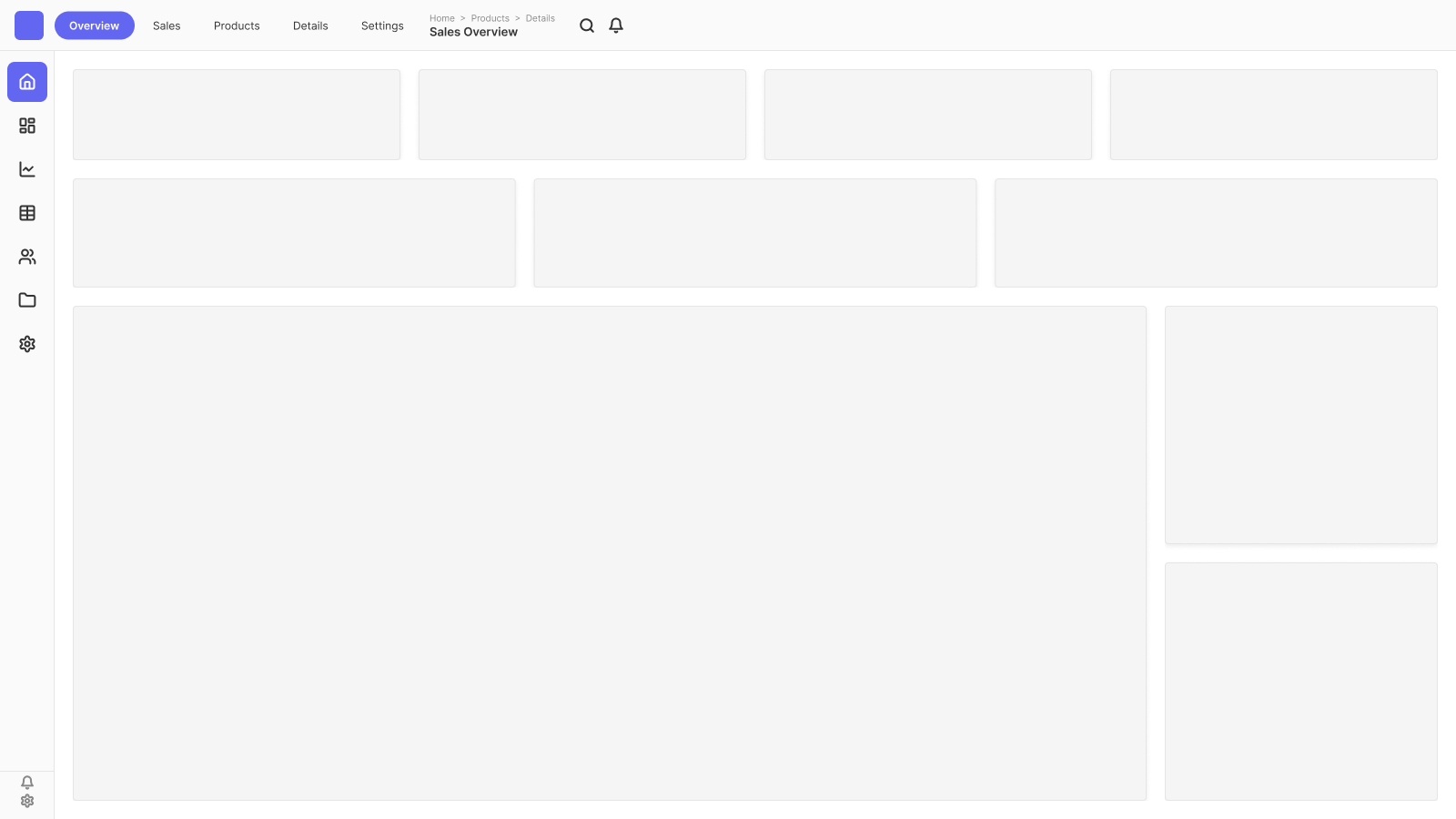


Three ways to get your exact colors and styles.
The plugin ships with 12 polished color presets. If they’re not the right ones for your brand, you have options — and every output stays a native Figma frame, so anything is editable on the canvas afterwards.
1. Use a built-in preset
12 polished themes ready to go: Clean White, Navy Soft, Cool Slate, Warm Sand, Sage Forest, Charcoal, Dark Teal, and more. One click in the plugin.
Effort: 0 minutes
2. Hire me — custom plugin version
I edit the plugin’s source (code.js + manifest) and bake your exact brand colors into the plugin itself. Your team gets a personalised .zip — every background uses your palette automatically. No manual recolouring, ever.
Effort: Send me a logo + brand guide. I send you a custom plugin.
3. Edit manually in Figma
After generating a background, every frame is a native Figma object. Recolour any card, change any element. Free, but slower if you do this on every export.
Effort: A few minutes per background, every time.
Style controls beyond colour
Whitespace · corner radius · shadow depth — set per output, baked into the layout.
Honest tip — about the “custom plugin” option
Hire me and you get a one-time-built personalised plugin: your brand colours, your spacing defaults, your sidebar look — all hard-coded into the plugin source. Send me a logo or brand guide, get back a custom .zip. Or do it yourself with an AI tool to extract hex codes from your brand assets — that works too, but mistakes happen and I don’t take warranty on AI-picked colours. Either way is fine — one is paid and exact, the other is free with caveats.
For the custom-plugin option, email [email protected] with your brand assets.
Everything you need for professional Power BI backgrounds.
Native Figma. Full editability. Real auto-layout. No locked assets.
60 seconds per background
Click through five settings and export. Faster than opening Photoshop. Use the saved time on the data work that actually matters.
Pixel-perfect dashboard wireframes
18 layouts built from real Power BI reports. KPIs, visuals, sidebars positioned by hand — once. Then auto-layout keeps everything aligned.
Multiple export formats
Export your Power BI background as PNG, JPG, or SVG at any scale. Upload directly to the Power BI canvas.
Custom brand colors
12 built-in presets out of the box. Need your exact corporate palette? Hire me for a custom plugin version with your colors hard-coded — your team gets a personalised .zip.
Fully editable afterwards
Everything the plugin outputs is a native Figma frame. Move, resize, delete, rename, recolor any element. No locked assets.
Dark mode included
4 dark mode presets out of the box — Navy, Charcoal, Midnight, Dark Teal. Switch from light to dark in one click.
From hours to seconds. From €400 per dashboard to zero.
What the plugin saves you on every Power BI dashboard you build — and how the savings compound across reports.
Manual wireframing in Photoshop or PowerPoint at €50/hr
One-time payment — no subscription
Compounding savings — pays for itself, then keeps paying.
€199 plugin. €400 saved per dashboard. The math gets better the more you build.
A Power BI background should not take longer to design than the data model itself. The plugin closes that gap — every report you ship.— Lukas Reese, Power BI Consultant & Dashboard Designer
€199. Only the first 25 customers.
Launch sale: the first 25 customers pay €199. After that, the price moves to €249. One-time purchase either way — no subscription, no recurring fees.
Background Designer Figma Plugin
One-time purchase · no subscription
- Generate unlimited dashboard backgrounds in 60 seconds
- 18 dashboard wireframes + 12 color presets
- 5-step workflow: grid → nav → KPIs → style → color
- 0–10 KPI cards, any position
- Native Figma auto-layout — fully editable on the canvas
- Optional: custom plugin version with your brand colors (separate quote)
- Export PNG, JPG, or SVG — drop into Power BI
- Step-by-step install & usage guide
- Direct email support from Lukas
Install in 30 seconds. Build in 60.
The plugin ships as a downloadable zip from LemonSqueezy. Runs inside Figma Desktop — which is free from figma.com. No license keys, no cloud dependency, your files stay local.
- Buy & download. After purchase, you’ll receive
background-designer.zipby email from LemonSqueezy. - Extract to a permanent folder. Unzip to a stable location — e.g.
Documents/Figma-Plugins/background-designer/. The three files (manifest.json,code.js,ui.html) must stay in the same folder. - Open Figma Desktop. Browser Figma won’t work — the plugin is loaded locally from your machine. Figma Desktop is a free download from figma.com/downloads.
- Import the manifest. Plugins → Development → Import plugin from manifest, then select
manifest.jsonfrom the extracted folder. - Run it. In any Figma file: Plugins → Development → Background Designer. The panel opens on the right. Walk through the five settings and click Generate.
Full install & usage guide with screenshots
Step-by-step walkthrough on the blog — every setting explained, troubleshooting for common install issues. Read the full install & usage guide →
Just need ready-made dashboard templates?
72 pre-built Power BI dashboard backgrounds, no plugin required — from €69.
Common questions about the Power BI Background Designer plugin.
What is the Power BI Background Designer plugin?
A Figma plugin that generates pixel-perfect Power BI dashboard backgrounds from five settings: grid layout, navigation, KPI cards, style, color. Outputs are native Figma frames you export as PNG, JPG, or SVG and upload to Power BI as the canvas background. Designed in Figma. Built for Power BI.
Does it really work in 60 seconds?
Yes — once you’ve installed the plugin, generating a fresh dashboard background takes under a minute. First-time users may take 5–10 minutes the very first time while exploring the settings; from the second background onward, 60 seconds is the realistic target. The five steps are deliberately simple: pick a layout, toggle navigation, set KPI count, tune the style, pick a color, hit Generate.
What format can I export the background in?
PNG, JPG, or SVG. All three work as Power BI canvas backgrounds. PNG is recommended for crisp visuals at any zoom. JPG works for photo-heavy designs. SVG is perfect when you want vector scaling across multiple canvas sizes. Export from Figma’s standard Export panel.
Do I need a paid Figma plan to use the plugin?
No. Figma is free to start — no credit card required. The free Starter plan is enough to install and run the Background Designer plugin. Paid plans (Professional, Organization) exist for teams that need extra collaboration features, but the plugin works the same on any plan, free or paid.
Does it work in Figma on the web, or only Figma Desktop?
Figma Desktop only. Browser Figma cannot load local third-party plugins. The plugin is delivered as a zip you import into Figma Desktop. Figma Desktop is a free download from figma.com/downloads — no paid plan required.
Will the export fit my Power BI report page?
Yes. The plugin generates the background at whatever canvas size you set — 1280×720, 1280×780, 1600×900, 1920×1080, or custom. Match the canvas size to your Power BI report page and the export will fit precisely. Use Image Fit = “Fit” in Power BI’s canvas background settings.
Can I edit the generated background afterwards?
Yes — that’s the point. Everything the plugin outputs is a native Figma frame with auto-layout. Copy, paste, resize, delete, recolor any element. Move a KPI card. Change a chart zone. Add your logo. Auto-layout keeps the spacing clean.
Can I add my own brand colors?
Two paths. Quick: after generating a background, recolor any element directly in Figma — every frame is editable. Better: hire me to build you a custom plugin version with your exact brand colors hard-coded into the source. You get a personalised .zip; every background your team generates uses your palette automatically. Email [email protected] for the custom-plugin option.
How is this different from the templates?
The templates are 72 pre-built Figma files — buy, open, export. The plugin is the engine that generated them — plus thousands of other combinations. Templates are cheaper if you need a handful of backgrounds. The plugin pays back fast if you build many Power BI reports.
Can I use the plugin on client projects?
Yes. One-time purchase, unlimited commercial use on client and consulting projects. You cannot resell the plugin itself, but any output (backgrounds, exported PNG/SVG, edited Figma files) is yours to use in any deliverable.
Does it only work with Power BI?
The dashboard wireframes are optimized for Power BI canvas backgrounds, but the exported images work in Tableau, Looker Studio, slide decks, or any tool that accepts background images. Match the canvas size to your target tool.
What’s in the download?
A zip containing three files — manifest.json, code.js, and ui.html — plus a README with install steps. All three must stay in the same folder. Extract once, import in Figma Desktop, done.
Are updates included?
You’re buying v1.0 as it ships today. One-time purchase, no subscription, no recurring fees. Bug fixes during normal product support are included. Future major versions with significant new features may be released as separate paid upgrades — those decisions haven’t been made yet, so I’m not making any promises beyond the current version.
What if I run into a problem?
Email [email protected]. Support comes from me directly — solo shop, not a ticket queue.
Open Figma. Pick a layout. Export your Power BI background in 60 seconds.
One-time purchase. No subscription, no recurring fees. Designed in Figma. Built for Power BI. Don’t wait too long — once 25 customers buy at €199, the price moves to €249.