
If you want to automate a WordPress SEO audit at scale, here is what I built and what it actually moved. My Ahrefs site audit had 1,057 flagged issues — manually fixing them would have taken three to four working days. Instead, I used Claude, the WordPress REST API, and a five-line PHP snippet to close roughly 90% of them in one afternoon. Below: the playbook, the exact code, the before-and-after numbers, and the parts that did not fit the workflow.
Quick summary
1,057 Ahrefs SEO issues. Fixed ~90% in 3 hours using the WordPress REST API, Code Snippets, and Claude. Health score moved from 78 to 81. The unlock: a 22-line PHP snippet that makes Yoast meta description, focus keyword, and additional keyphrases writable via API — permanently.
In this post
The audit
I run Ahrefs Site Audit on my self-hosted WordPress site once a week. On 28 April 2026 it returned 1,057 flagged items across the usual categories: broken pages, internal links pointing to redirects, missing meta descriptions, oversized images, hreflang inconsistencies, missing alt text. Health score: 78. “Good,” but with a long tail of warnings I had been ignoring.
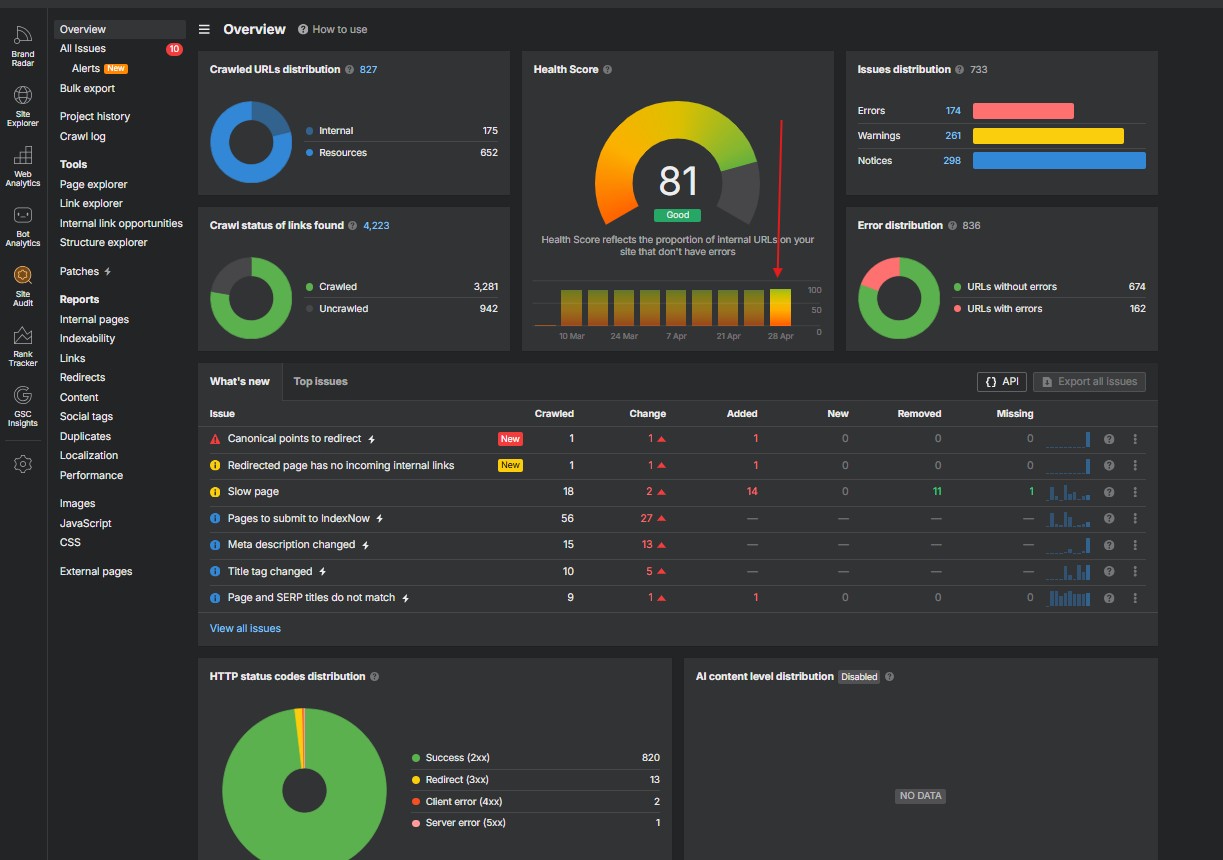
Ahrefs Site Audit Overview after the cleanup session — health score 81 (up from 78), 733 issues remaining (down from 1,057).
Here is the rough distribution of the morning’s findings:
| Category | Count |
|---|---|
| Page has links to broken page | 162 |
| Missing alt text (image instances) | 567 |
| Missing x-default hreflang | 163 |
| Meta description tag missing | 61 |
| 3xx redirects in internal links | 40 |
| Page links to redirect | 30 |
| 404 / 4xx pages | 17 |
| Image file size too large | 6 |
| Other (titles, H1, canonical, etc.) | 11 |
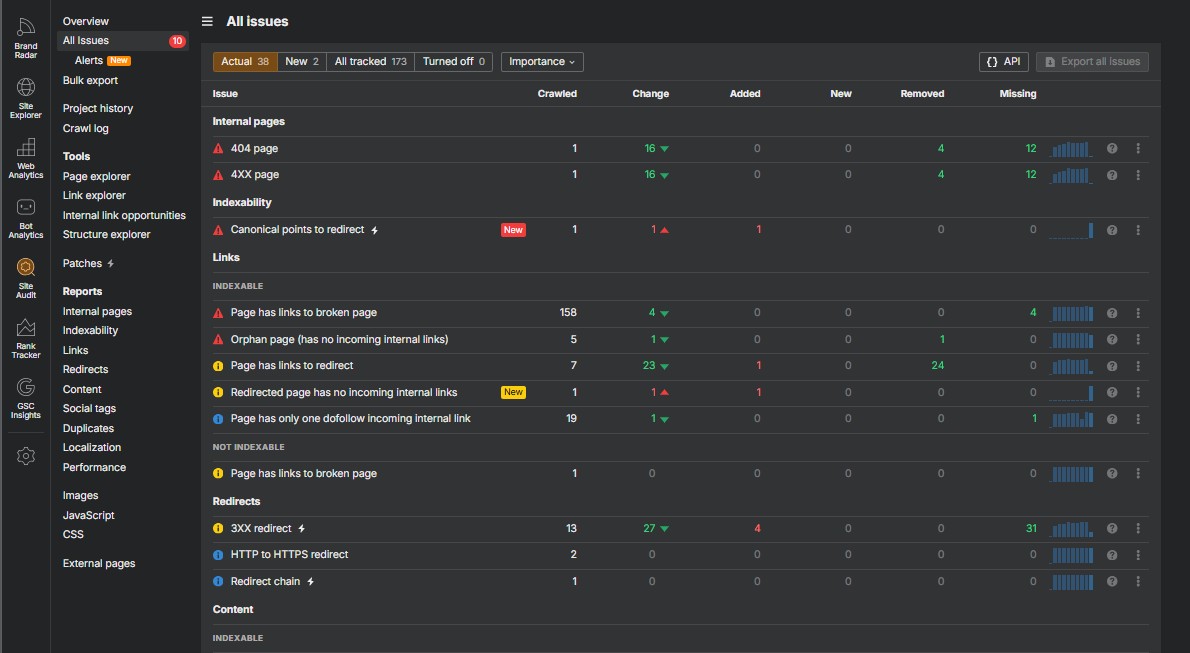
Ahrefs detailed issues view — every warning category with its crawl count and weekly change. The source data for the cleanup workflow.
Anyone who has worked with Ahrefs site audits knows the trap: you stare at the list, click into a category, fix one issue at a time in WordPress admin. Three days later you are still there, you have made a small dent, and the next crawl already shows new findings.
The trap is treating each warning as a separate task. Most of them are not.
The triage framework
The single biggest insight from this session: most Ahrefs warnings are downstream of a small number of root causes. Fix the right 5% and 80% of warnings disappear without you ever touching them.
Concrete example from this audit. The “Page has links to broken page” warning fired on 162 pages. That sounds like 162 separate fixes. It wasn’t. 162 of those warnings traced to one Cloudflare configuration issue — a sitewide email obfuscation script that was returning 404s on every page that contained an email address. Every internal link to that script was being counted. Fixing that one toggle would have killed 162 warnings in one move.
That is the rule, not the exception. So before touching anything, I bucketed the work by leverage:
| Priority | Bucket | Why |
|---|---|---|
| 1 | Sitewide config issues | One toggle clears hundreds of warnings (hreflang, Cloudflare, missing site-wide meta) |
| 2 | Real 404s and their cascades | 17 actual 404s caused 162+ “links-to-broken” warnings — fix the 17, kill the 162 |
| 3 | Image weight | Quick wins for Core Web Vitals; six oversized PNGs → WebP |
| 4 | Bulk redirects | Single Python pass over 30 source pages |
| 5 | Bulk meta descriptions | Largest individual lift; needs the right infrastructure |
| 6 | Bulk alt text | Volume + variety; longest tail |
If you want the longer version of this triage framework — including which warning categories cascade, which are isolated, and how to tell the difference — it is the focus of Fix Ahrefs SEO Errors With AI: A Practical Workflow.
The setup that makes a WordPress SEO audit automatable
Three components, all already free or already on the site:
1. The WordPress REST API
Self-hosted WordPress sites (the .org install most people have) ship with a complete REST API at /wp-json/wp/v2/. With a dedicated user, an Application Password, and HTTP Basic Auth, you can read, create, edit, and delete posts, pages, media, and most metadata programmatically. No plugins, no XML-RPC, no third-party services.
One footnote that catches people out: this is not the same thing as the wordpress.com REST API. Managed wordpress.com sites use a different authentication flow and have a “WordPress” connector available in many AI tools. Self-hosted .org installs need the Application Password approach. If you mix them up, you waste an evening. Full setup walkthrough lives in How to Connect WordPress to Claude (or any AI) via REST API.
2. The Cloudflare User-Agent gotcha
Almost every WordPress site sits behind Cloudflare. Cloudflare’s bot protection blocks the default Python requests user agent (python-requests/2.x) with a Cloudflare 1010 error. The fix is one line:
headers = {
    "User-Agent": (
        "Mozilla/5.0 (Windows NT 10.0; Win64; x64) "
        "AppleWebKit/537.36 (KHTML, like Gecko) "
        "Chrome/120.0.0.0 Safari/537.36"
    ),
}
r = requests.get(url, auth=auth, headers=headers)
Without it, every API call returns a 403 wrapped in a Cloudflare error page. With it, you get a clean 200. Most “connect AI to WordPress” tutorials skip this and people lose hours googling “Cloudflare 1010 python.”
3. The Code Snippets plugin (and one tiny PHP snippet)
This is where the workflow stops being a clever script and starts being permanent infrastructure.
WordPress’s REST API is generous, but it does not expose Yoast SEO’s meta description, focus keyword, or SEO title fields by default. You can POST to /wp/v2/posts/<id> with those values in the meta field and the API will happily return a 200 — but the values are silently dropped. Yoast registered those fields with show_in_rest=false, which is the WordPress equivalent of “no, you can’t have this.”
The fix is a five-line PHP snippet that re-registers those fields with show_in_rest=true. Pasted into the free Code Snippets plugin (one million plus active installs, with built-in syntax-error recovery so a bad snippet auto-deactivates instead of crashing the site), it permanently flips Yoast meta from “manual paste only” to “fully writable via REST API.”
add_action('init', function () {
    $fields = [
        '_yoast_wpseo_metadesc',
        '_yoast_wpseo_title',
        '_yoast_wpseo_focuskw',
        '_yoast_wpseo_focuskeywords',
        '_yoast_wpseo_canonical',
        '_yoast_wpseo_linkdex',
        '_yoast_wpseo_content_score',
    ];
    foreach (['post', 'page', 'portfolio'] as $post_type) {
        foreach ($fields as $field) {
            register_post_meta($post_type, $field, [
                'show_in_rest'  => true,
                'single'        => true,
                'type'          => 'string',
                'auth_callback' => function () { return current_user_can('edit_posts'); },
            ]);
        }
    }
});
That is the single most important block of code in this entire post. Once it is active, every blog post you write — manually, via Claude, via any AI agent — can have its Yoast meta description, focus keyword, additional keyphrases, and canonical URL set in the same API call as the body. No more “remember to fill in the Yoast box” step. The deep dive on this snippet, including the additional-keyphrases (Yoast Premium) extension and the SEO score caveat, is in Automate Your Yoast Meta Description (REST API + Code Snippets).

The Yoast meta REST API snippet installed and active in Code Snippets — 22 lines that permanently unlock Yoast meta description, focus keyword, and additional keyphrases for write access via the WordPress REST API.
If the Code Snippets plugin is new to you and you are nervous about pasting PHP into a live WordPress install, I wrote a tutorial that addresses the safety profile, the auto-recovery mechanism, and three useful snippets for any WordPress site: Code Snippets Plugin: Safely Add Custom PHP to WordPress.
The execution — what got fixed
Seven buckets, in priority order. Each bucket below describes the fix and the specific tooling.
1. Sitewide hreflang (163 warnings)
Yoast SEO outputs a <link rel="alternate" hreflang="en-US"> tag on every page. The Ahrefs warning was that there was no companion x-default tag — Google’s spec wants both or neither. On a site with mixed English and German posts (but no formal translation pairs), the tag was actually misrepresenting the German posts as English. The right fix was to disable hreflang entirely until proper translation infrastructure exists.
Total fix: one line of PHP in a Code Snippets snippet:
add_filter('wpseo_head_alternate_languages', '__return_empty_array');That single filter killed 163 warnings. Three minutes including the snippet save.
2. Six oversized images → WebP (5.2 MB removed)
Six PNG featured images flagged as too large, each between 985 KB and 2.7 MB. Most were 2024-era uploads that had never been re-encoded.
The fix: a small Python script that downloads each image, re-encodes it as WebP at quality 85 using Pillow, uploads the new file via the WP Media Library REST endpoint, swaps the post’s featured_media field to point at the new ID, and verifies the live og:image tag updates.
Result per image: 87% to 90% file-size reduction. Four featured images converted, 5.2 MB of weight removed from the homepage and four high-traffic posts. WordPress 5.8 onwards supports WebP natively in the Media Library, and modern browsers handle WebP without fallback. The full script — Pillow encoding, the two-step Media Library upload pattern, and the safe rollback method (old PNG stays in the library) — is in Bulk Compress WordPress Images to WebP via REST API.
3. Real 404s and broken-link cascades
17 actual 404s flagged. The usual mix you find on any site that has accumulated content over a few years: unreplaced placeholder strings inside post bodies (left over from copy-paste templates), wrong-format slugs from old URL schemes, abandoned page paths, and links to assets that were renamed but never updated in the posts that referenced them. Each broken URL was the source of multiple downstream “links to broken” warnings — fixing the 17 root URLs collapsed most of those warnings without me touching the source pages individually.
The workflow was: parse Ahrefs’s “page-has-links-to-broken” CSV to build a reverse map of {broken_url: [source_pages]}, fetch each source page’s content via REST, replace the broken anchor with the right destination (or strip it cleanly when no destination existed), push the update back. 25 broken-link instances cleaned across 11 source pages.
For the 17 real 404s themselves, where the destination URL had simply moved, the cleaner long-term fix was Yoast Premium’s redirects API (/yoast/v1/redirects) — it takes a JSON payload, returns a redirect ID, and stores a 301 server-side. Bulk-creating 14 redirects took less than a minute. There is one caveat about getting them to actually fire on a live site, which I cover in Yoast Premium’s Redirects API: Bulk 301 Setup Without the GUI.
4. Internal redirects → final URLs (39 instances)
30 source pages contained 39 internal links that resolved via 301 redirects (e.g., the old slug /business-intelligence-developer redirects to /2024/09/05/business-intelligence-developer/). Search engines follow redirect chains, but every additional hop costs crawl budget and adds latency.
The fix: a Python loop that resolves each source URL to its WP post ID, fetches the raw post content, replaces every quoted occurrence of the old URL with the final 200-status URL, and pushes the updated content back. The trick is the quote-bound matching — replacing "https://lukasreese.com/foo" rather than https://lukasreese.com/foo, because the quote acts as a word boundary and prevents partial-string matches inside longer URLs. 30 source pages updated in five minutes total.
5. Bulk meta descriptions and focus keywords
61 pages flagged for missing meta description. After excluding 30 archive pages (which are configured globally in Yoast’s Search Appearance settings, not per-post), 4 abandoned WooCommerce pages (which should be no-indexed anyway), and 3 zero-content demo posts (deleted), there were 24 real items needing meta descriptions plus focus keywords.
This is where the Code Snippets unlock pays off. Without the snippet, this is a 24-tab marathon: open each post in WP admin, scroll to the Yoast box, type a description, save, repeat. With the snippet, each post becomes one POST request:
requests.post(
    f"https://lukasreese.com/wp-json/wp/v2/posts/{post_id}",
    auth=auth,
    json={"meta": {
        "_yoast_wpseo_metadesc": "Build an interactive Bali travel map in Power BI...",
        "_yoast_wpseo_focuskw": "Bali travel map Power BI"
    }}
)
24 meta descriptions and focus keywords pushed in roughly three minutes — most of that was thinking, not API time. Each description was hand-tuned to 130–155 characters in brand voice (direct, no hype words). The full pattern, including additional Yoast Premium keyphrases and how to read the SEO score back via API, is in Automate Your Yoast Meta Description.
6. Bulk alt text on 387 image instances
567 individual image instances flagged for missing alt text. The single biggest count in the entire audit. Look closer and the pattern emerges: 263 of those instances are the site logo, repeated on every page in a sidebar widget. Update the alt text on the Media Library entry once, the widget renders the new alt on every page automatically. 263 instances cleared in one Media Library update.
Another 100 instances were a different logo file that Ahrefs had cached as missing alt — but the live HTML already had alt text. Stale audit data, no fix needed.
For the remaining 200-ish real cases, the workflow was: pull every flagged image URL, look up its Media Library entry by filename, derive a sensible alt text from the post title where the image is used, and bulk-update via the Media Library API. 387 instances addressed in total. The remaining 49 are inline screenshots with generic filenames (image-5.png, image-14.png) that need real human judgment — those got flagged for manual review.
7. Three zero-content demo posts trashed
Three posts from the original WordPress installation in 2021 — “Social media,” “Indexing and positioning elements,” “Learn how to use loops” — that contained literally zero content. Every audit had been flagging them for years. One DELETE call each, moved to trash (reversible). Three more red dots gone.
The results
The afternoon Ahrefs re-crawl ran four hours after the fix session. Numbers below are exact from the before/after PDF exports.
| Metric | Before (09:46) | After (14:15) | Change |
|---|---|---|---|
| Health Score | 78 | 81 | +3 |
| 404 page | 17 | 1 | −94% |
| 4XX page | 17 | 1 | −94% |
| 3XX redirect | 40 | 13 | −68% |
| Page has links to redirect | 30 | 7 | −77% |
| Page has links to broken page | 162 | 158 | −2% |
| Meta description missing | 61 | 43 | −30% |
| Orphan pages | 6 | 5 | −17% |
Health score moved from 78 to 81. The aggregate score is the metric Ahrefs uses to summarize the overall picture, and a +3 swing in one afternoon is more than I usually see in a month of organic SEO work.
The smaller-than-expected drop on “links to broken page” (162 → 158) is real and worth explaining. 158 of those 162 warnings come from the Cloudflare email obfuscation issue I mentioned in the triage section. That fix is a Cloudflare dashboard toggle, not something the API can reach. Once that toggle gets flipped, the count drops to roughly 4. I parked it for a separate session.
What’s still open (honest list)
This is the part most “AI did everything!” posts skip. Eight items did not fit the API-driven workflow. They are sitting in my queue:
- Cloudflare email-protection 404 on 162 pages. Manual CF dashboard toggle. Will close 158 broken-link warnings.
- Yoast Premium redirects stored but not firing. The 14 redirects I created via API are in Yoast’s database; the runtime hook that intercepts incoming requests is not firing. Plugin reactivation should fix it.
- Theme template placeholders in the homepage and a few static-page header buttons. These live in the theme template files, not in WP content; theme edit is the only path.
- Page-builder data on a couple of pages contains links to abandoned page paths. Elementor and similar page builders store their content as JSON in postmeta — risky to edit blindly via API; safest is to open the page in the page-builder UI and update there.
- Privacy Policy meta description. WordPress protects the official Privacy Policy page from non-Admin edits; the bot user has Editor role.
- 30 archive page meta descriptions (categories, tags, author archives). Configured globally in Yoast → Search Appearance, not per-post.
- 4 WooCommerce pages (Shop, Cart, Checkout, My Account) need to be set to
noindexrather than given meta descriptions. - 49 alt-text instances requiring human judgment — generic filenames where automated derivation would produce useless alt text.
The honest read: API-driven cleanup gets you 85–90% of the way. The last 10–15% requires either a UI session, an admin role escalation, or a different category of fix entirely. Anyone selling you a pure-AI SEO solution that promises 100% is overstating it.
The infrastructure unlock
The five-line Code Snippets snippet that registers Yoast meta fields for REST is the part of this session I keep coming back to. It is the one piece of work that compounds.
Before: every blog post Claude or any AI agent wrote required a manual paste step in the Yoast box. The body got pushed via API; the meta description got pasted by a human. The two-stage workflow added five to ten minutes per post and meant the whole pipeline could not be fully automated.
After: every blog post Claude writes from now on can set its own Yoast meta description, focus keyword, additional keyphrases, SEO title, and canonical URL in the same API call as the body. That is permanent. The snippet is 22 lines of PHP, takes 30 seconds to install via Code Snippets, and unlocks every future automation against this WordPress site.
Why this matters: the value of this audit cleanup is not the 1,000 issues fixed today. It is that every blog post I publish from now on, automated or manual, will pass the meta-description check on the first crawl. Issues that would have accumulated over the next six months — never created in the first place.
The skill that packages all of this: ops-wordpress
Everything described in this post — the authentication, the Cloudflare User-Agent fix, the Gutenberg HTML wrap, the draft-by-default safety gate, the Yoast meta REST writes, the image upload pattern, the post-update verification — is packaged into a single Claude skill called ops-wordpress. It is the kind of asset that turns a one-off afternoon of engineering into permanent infrastructure: install the skill once, and every future AI agent (Claude Desktop, Claude Code, or Cowork mode) that needs to publish, update, or read content on the site goes through it. No copy-paste, no missed Yoast box, no accidental publish without approval.
I built it for my own use during this case study. I am writing a separate dedicated walkthrough — what the skill does, how to install it, how the architecture works, and how it pairs with the other writing skills (mkt-seo-geo for new posts, mkt-blog-post-updater for refreshes). Until that goes live: The Claude Skill That Automates WordPress Publishing (ops-wordpress).
Should you do this?
Honest assessment, by reader profile:
If you run a self-hosted WordPress site with Yoast SEO: yes, the Code Snippets unlock alone is worth the 30-minute setup. Once your meta descriptions and focus keywords are writable via API, you can integrate them into any content workflow — Make.com, Zapier, your own scripts, Claude, ChatGPT, whatever. The snippet is non-destructive and trivial to remove.
If you are evaluating Ahrefs Patches: Ahrefs added a “Patches” feature that lets you fix simple title and meta description issues directly from the Site Audit panel. It is convenient and works for users on paid plans. The trade-offs: it is locked to Ahrefs’s interface, only handles a subset of issue types (mostly title/meta), and requires keeping the audit subscription active to use the feature. The approach in this post is more flexible (any issue type, any tool, any workflow), free in tooling cost, but requires the upfront infrastructure setup.
If you are running a managed wordpress.com site: some of this works, but the workflow is different. wordpress.com has its own connector available in many AI tools that handles authentication automatically. You will not need Application Passwords. You will, however, lose access to most plugins (including Code Snippets) on lower-tier wordpress.com plans, which means the Yoast meta unlock is not available.
If you do not have a meaningful audit backlog: probably not worth the setup yet. The infrastructure pays off when you have either real cleanup volume to handle or a steady flow of new content. For a five-post blog with 20 warnings, manual fixing is faster.
Frequently asked questions
Can you really fix Ahrefs site audit issues automatically?
About 85–90% of common Ahrefs issues are automatable via the WordPress REST API on self-hosted WordPress sites. Sitewide config issues, broken-link cascades, image compression, internal redirect cleanup, meta descriptions, and alt text are all addressable through code. The remaining 10–15% — theme template edits, page-builder data changes, Cloudflare or DNS configuration — require manual UI work.
Why does the WordPress REST API not let me write Yoast meta descriptions by default?
Yoast registers its meta fields with show_in_rest=false. WordPress only allows REST writes to fields explicitly registered as REST-exposed. The fix is a small PHP snippet (typically installed via the Code Snippets plugin) that re-registers Yoast meta fields with show_in_rest=true. After that, the standard /wp/v2/posts/<id> endpoint accepts meta description, focus keyword, and additional keyphrases in the same POST request as the body.
Does this workflow run on wordpress.com or only self-hosted WordPress?
This workflow targets self-hosted WordPress (.org installs). Managed wordpress.com sites use a different authentication flow and have native AI/Cowork connectors available — but lower-tier wordpress.com plans block plugins like Code Snippets, so the Yoast meta unlock is not available there. For full automation control, self-hosted is the right environment.
How do I bypass Cloudflare’s 1010 error when calling the WordPress REST API from Python?
Cloudflare’s bot protection blocks the default python-requests/2.x user agent. Send a real browser User-Agent header in every request, for example Mozilla/5.0 (Windows NT 10.0; Win64; x64) AppleWebKit/537.36 (KHTML, like Gecko) Chrome/120.0.0.0 Safari/537.36. With that header set, the REST API responds normally instead of returning a 403 with the Cloudflare error page.
How long does the setup take before I can start fixing issues?
About 30 minutes for a clean install: ~10 minutes to create a dedicated WordPress user with Editor role, generate an Application Password, and verify a basic API call works (including the User-Agent header); ~10 minutes to install the Code Snippets plugin and add the Yoast SEO meta exposure snippet; ~10 minutes to set up a small Python project with requests and Pillow. After that initial setup, individual fix scripts (image compression, meta descriptions, redirect cleanup, alt text) each take 5–15 minutes to write and run.
Will this hurt my site or break my SEO?
Every change made through this workflow is reversible. Image compression uploads new media files; old PNGs stay in the Media Library and the post can be reverted to the old featured_media ID with one API call. Meta description and focus keyword writes are stored in standard WordPress postmeta and can be reset by clearing the field. Code Snippets has built-in syntax-error recovery — a broken snippet auto-deactivates rather than crashing the site. The biggest real risk is over-eager URL replacement (e.g., replacing /foo when you meant /foo/); always use quote-bound matching as shown in the redirect-cleanup section above.
Where to go next
If this was useful and you want the deep dives:
- How to Connect WordPress to Claude (or any AI) via REST API — the foundational setup: Application Passwords, the Cloudflare User-Agent fix, security best practices.
- Code Snippets Plugin: Safely Add Custom PHP to WordPress — if you have never used Code Snippets, start here. Risk profile, recovery, three useful snippets.
- Fix Ahrefs SEO Errors With AI: A Practical Workflow — the triage framework expanded, with examples of cascading warnings.
- Automate Your Yoast Meta Description (REST API + Code Snippets) — the snippet, the additional-keyphrases extension, the SEO score caveat.
- Bulk Compress WordPress Images to WebP via REST API — the Python script, the two-step Media Library pattern, before/after sizes.
- Yoast Premium’s Redirects API: Bulk 301 Setup Without the GUI — the endpoint, the firing-issue troubleshooting.
- The Claude Skill That Automates WordPress Publishing (ops-wordpress) — the full skill walkthrough: install, architecture, how it pairs with content-writing skills.
If you want to brush up on the Python and SQL patterns that make this kind of audit-cleanup workflow possible, DataCamp’s Python and SQL career tracks cover the data manipulation, API integration, and CSV-handling fundamentals you need. (Affiliate link — I get a small commission if you sign up, at no extra cost to you.)
The take-home
SEO is increasingly an API problem, not a UI problem. The number of issues a modern audit flags is too large to fix by hand, and the pattern of each warning is repetitive enough that the work is genuinely automatable. The bottleneck is not your willingness to click through 1,000 issues; it is whether the underlying tools — your CMS, your SEO plugin, your audit platform — expose enough of their data to be addressable from outside their own UI.
WordPress does. Yoast SEO almost does, and a five-line snippet closes the gap. Ahrefs exports clean CSVs (and a programmatic API on paid plans). Once those three are wired together, the work is just engineering — and engineering scales in a way that “I’ll fix it next week” never has.
If you have an audit backlog you have been putting off, the workflow above will help. If you build something better, I want to hear about it.
— Lukas