
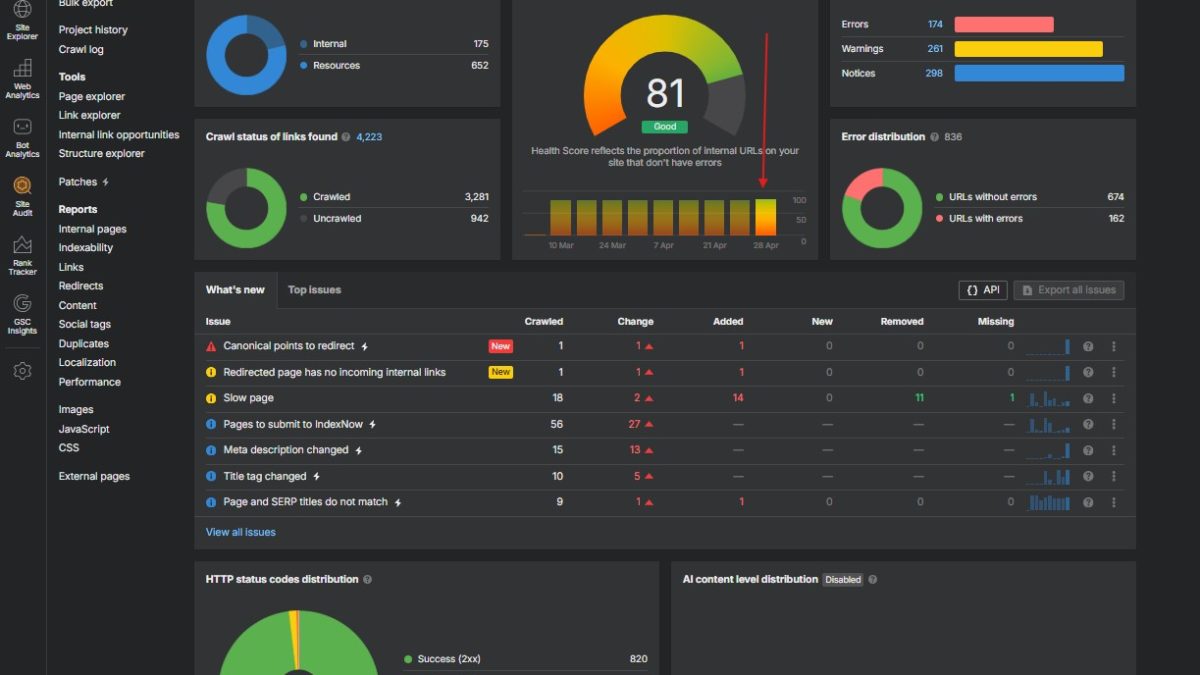
To fix Ahrefs SEO errors fast, stop fixing them in PDF order. However tempting it is to start at the top of the audit export and work down, most warnings cascade from a small number of root causes. As a result, fixing one configuration issue often clears 50 to 200 warnings at the next audit run. Fixing the same warnings page by page can take a full work week.
This post lays out the triage framework that turned a 1,057-issue audit into a three-hour cleanup. Specifically, it covers the cascading-warning model, the order in which to attack categories, where AI plus the WordPress REST API beats clicking through admin, and an honest comparison with Ahrefs Patches. In other words, it is the playbook from a real audit, not a generic checklist.
Most Ahrefs warnings are downstream of a small number of root causes. Specifically, sitewide configuration, root-cause 404s, and redirect chains drive the cascades. Triage by cause, then bulk-fix the rest with AI and the WordPress REST API. As a result, an audit can drop 30 to 40 percent in three hours, not three weeks.
Why “fix in PDF order” is the wrong way to fix Ahrefs SEO errors
Ahrefs Site Audit reports group issues into errors, warnings, and notices. As a result, the natural instinct is to start at the top of the report and work down: fix the errors first, then warnings, then notices. However, that order optimises for severity, not for cause. Specifically, severity tells you how bad each instance is. Cause tells you how many instances exist.
One Cloudflare configuration toggle can produce 162 broken-link warnings spread across 162 pages. Each warning is real. Each one is the same problem. Furthermore, fixing them one by one in WP admin is a four-hour click-through that ends with the same audit running again the next week, finding the same warnings, because nobody changed the underlying configuration.
The fix order should follow cause, not severity. In particular, sitewide settings come first because they fan out to the most pages. Individual page edits come last because they only affect one URL each. The triage section below codifies this.
The cascading-warning framework
A cascading warning is a single root cause that produces many flagged instances in the audit. Specifically, one configuration error, one stale link in a theme template, or one redirect chain can raise the warning count by 100 or more without affecting actual content quality.
A cascading warning is an Ahrefs Site Audit issue that fires on dozens or hundreds of pages but traces back to a single configurable source — theme code, a Cloudflare feature, a plugin setting, or one upstream redirect. Fixing the source clears every dependent warning at the next crawl.
Four signs you are looking at a cascade
- Count anomaly. One warning type counts in the hundreds while every other warning counts under 20. Specifically, anything that fires on more than 50 pages on a small site is a cascade until proven otherwise.
- Single referrer pattern. The flagged pages all link to the same target URL or template fragment. As a result, the “Page has links to broken page” CSV groups tightly when sorted by target.
- Sitewide config involvement. The warning text mentions canonical, hreflang, robots, redirects, or anything injected by Cloudflare or the theme. In particular, those are config-level surfaces, not content-level.
- Cluster of similar URL patterns. The flagged URLs share a path segment such as
/cdn-cgi/l/,/wp-content/plugins/, or any theme placeholder slot. Likewise, identical query strings can signal a plugin output.
Run the cascade test before opening any page editor. Specifically, sort the warning CSV by target URL, count repeats, and look for the four signs above. As a result, the warning list usually compresses by an order of magnitude.
Real example: 162 warnings, one fix
The reference audit flagged 162 instances of “Page has links to broken page (indexable).” In other words, 162 different URLs, all linking to a broken target. The first instinct was to open each page and remove the bad link. As a result, that estimate ran to four hours of pure clicking.
The cascade test changed the picture. Specifically, exporting the warning to CSV and grouping by target URL collapsed the 162 instances into a single offending pattern: every flagged page linked to a Cloudflare email-protection redirect that no longer resolved. In effect, the entire warning category was one configuration issue.
The fix took 30 seconds in the Cloudflare dashboard: disable the email obfuscation feature on the affected zone. Furthermore, the next audit cleared every dependent warning. No content was changed; no editor was opened.
That is the cascade pattern in action. In particular, the four signs from the previous section all fired here: count anomaly (162), single referrer pattern (Cloudflare URL), sitewide config involvement, and a clear URL cluster (/cdn-cgi/l/email-protection).
The triage order that actually works to fix Ahrefs SEO errors
The order below puts the highest-cascade categories first. Specifically, work from the most sitewide to the most page-specific. As a result, each step has a chance to clear warnings that the next steps would otherwise have to address one by one.
Step 1 — Sitewide configuration
Audit robots.txt, hreflang tags, canonical defaults, Cloudflare features, and theme template placeholders. In particular, theme placeholders such as static phone numbers, dummy calendar links, or unfinished button targets surface as broken-link warnings on every page that uses the layout.
Step 2 — Root-cause 404 errors
Group the 404 URLs by pattern before fixing any individual one. Specifically, look for repeated path segments, removed product lines, or obfuscation features (the Cloudflare cascade above is a 404 cluster). Furthermore, decide on a per-cluster basis whether to redirect, restore, or remove links to the source — not per page.
Step 3 — 3xx redirect chains
List every chain longer than one hop. Rewrite each chain so every origin URL points directly to the final destination. As a result, intermediate hops disappear, crawl budget is preserved, and link equity stops leaking through redirects.
Step 4 — Image weight reduction
Pull every image larger than 200 kilobytes. Convert each to WebP at quality 85 using Pillow, then upload the new files via the WordPress REST API and swap the featured_media reference on the host post. Specifically, the reference audit removed 5.2 megabytes from the homepage in one Python pass.
Step 5 — Bulk meta descriptions
Write meta descriptions for every page flagged as missing, then push them through the Yoast meta REST API endpoint exposed by the Code Snippets snippet. In particular, one POST per page can write all four Yoast fields (meta description, focus keyword, additional keyphrases, SEO title) in a single request.
Step 6 — Alt text and low-content pages
Generate alt text for every flagged image using the post topic plus the surrounding heading as context. Likewise, address thin pages last because their cascade impact is the lowest of any audit category. Specifically, an empty alt attribute affects accessibility on one image; a missing canonical affects every page that uses the layout.
Want to level up your technical SEO and Python automation skills?
DataCamp offers structured, hands-on courses in Python, SQL, and data engineering — the exact toolkit behind the AI plus REST API workflow in this post. New users get a significant discount on their first subscription.
Explore DataCamp Courses →Where AI plus REST API beats clicking through admin
Once the cascade fixes are in place, the remaining warnings are page-level. Specifically, missing meta descriptions, oversized images, alt-text gaps, and ad-hoc redirects. In other words, the long tail. Furthermore, the long tail is exactly where the WordPress REST API outperforms the WP admin click-through.
The bulk-write pattern is the unlock. One authenticated POST writes the body, the status, the Yoast meta description, the focus keyword, the additional keyphrases, and the featured-image reference in the same payload. As a result, what would be five tabs in WP admin becomes one Python call.
Before any of that runs, the connection has to clear Cloudflare. Specifically, the default python-requests User-Agent string returns a 1010 error on most production sites because Cloudflare blocks it. The fix is a real browser User-Agent header on every request — covered in detail in the WordPress plus Claude REST API setup post. Likewise, the Code Snippets path that registers Yoast fields with show_in_rest is documented in the Code Snippets WordPress tutorial.
# bulk-fix one page: body, status, Yoast meta, featured image
import requests
auth = ("claude-bot", APP_PASSWORD)
headers = {"User-Agent": "Mozilla/5.0 (Windows NT 10.0; Win64; x64) AppleWebKit/537.36 ..."}
payload = {
    "status": "draft",
    "content": new_html_body,
    "featured_media": 1848,
    "meta": {
        "_yoast_wpseo_metadesc":  "Fix Ahrefs SEO errors fast: triage by ...",
        "_yoast_wpseo_focuskw":   "fix Ahrefs SEO errors",
        "_yoast_wpseo_focuskeywords": '[{"keyword":"Ahrefs site audit fix","score":""}]',
    },
}
r = requests.post(WP + f"/wp-json/wp/v2/posts/{post_id}", auth=auth, headers=headers, json=payload)
r.raise_for_status()
That is the entire bulk-fix payload. In particular, replicating the same call across 24 pages took less than two minutes in the reference audit. By contrast, the WP-admin equivalent would have been 24 tabs, 96 form fields, and the same 24 Update buttons.
Ahrefs Patches vs the REST API approach
Ahrefs ships its own one-click fix feature called Patches. Specifically, Patches generates AI-written titles and meta descriptions and applies them via a JavaScript snippet that loads on every page. Furthermore, Patches works without any developer involvement — the trade-off is scope.
| Capability | Ahrefs Patches | REST API + Claude |
|---|---|---|
| Title and meta description rewrite | ✓ one-click, AI-generated | ✓ via Yoast REST |
| Bulk update across many pages | Partial | ✓ native |
| Yoast focus keyword + additional keyphrases | ✕ | ✓ |
| Featured-image swap or upload | ✕ | ✓ |
| Image compression and WebP conversion | ✕ | ✓ |
| Bulk 301 redirects | ✕ | ✓ via Yoast Premium API |
| Persistence | JavaScript overlay; needs script loaded | Stored in wp_postmeta permanently |
| Cost | Project Boost upgrade | Free if you self-host |
| Setup time | 0 minutes | ~30 minutes (one-time) |
| Best for | Single-issue fixes, no developer access | Cluster work, multi-field, repeatable |
Patches wins when the issue list is short, the team has no engineering bandwidth, and the fixes are limited to titles and meta descriptions. In other words, an SEO manager on a marketing-only site. Conversely, the REST API path wins when the audit spans hundreds of pages, the fixes touch images, redirects, and Yoast Premium fields, and the operator has 30 minutes to wire authentication once.
Both paths can coexist. Specifically, Patches handles one-off title rewrites; the API handles cluster-scale work. Likewise, the boundary is operational, not technical.
Real numbers: 78 to 81 in three hours
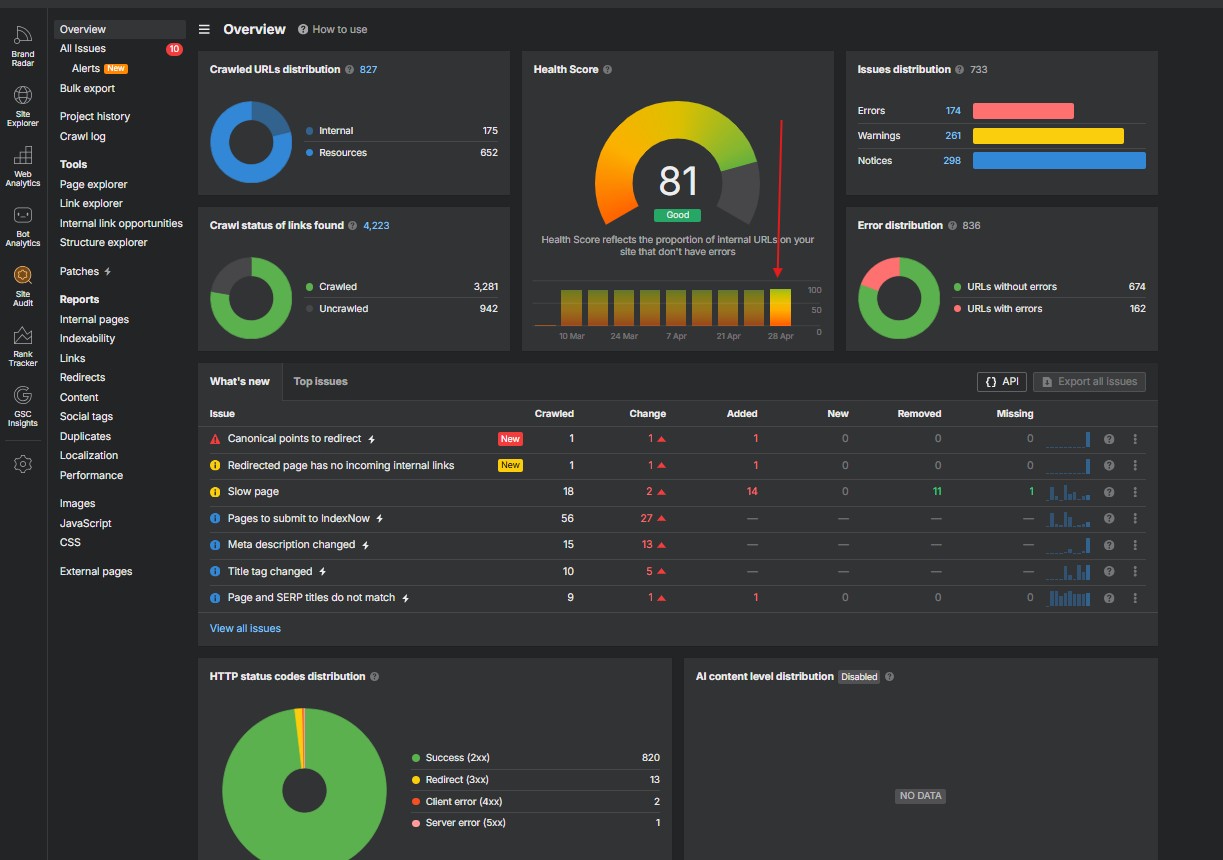
The reference audit started with 1,057 issues across errors, warnings, and notices. Specifically, the morning export showed health 78, 17 4XX pages, 40 redirects with chains, 30 pages linking to redirects, 162 broken-link warnings, and 61 missing meta descriptions. In other words, the dashboard looked rough.
Three hours later, the same audit showed health 81 (an Ahrefs “Good” score). As a result of cascading fixes plus bulk REST API operations, the category deltas read like this:
| Metric | Before | After | Change |
|---|---|---|---|
| Health score | 78 | 81 | +3 points |
| 4XX page errors | 17 | 1 | −94 percent |
| 3xx redirect chains | 40 | 13 | −68 percent |
| Pages linking to a redirect | 30 | 7 | −77 percent |
| Meta descriptions missing | 61 | 43 | 24 written via API |
| Image weight removed | — | — | −5.2 MB |
| Alt-text fixes | — | — | 387 instances |
The full case study, including the Python scripts and the audit PDFs, is in the pillar post on automating WordPress SEO audit cleanup. Specifically, that post walks the same numbers from a different angle — the workflow narrative rather than the triage framework.
What AI still cannot fix
Transparency matters more than perfection. Specifically, claiming that AI fixed 100 percent of the audit would be wrong, and the residuals carry their own credibility weight.
- Theme template placeholders. A theme that ships with placeholder URLs in its header buttons surfaces those on every page until someone edits the theme file. Furthermore, the REST API does not expose theme files; that fix lives in WP admin or a child theme.
- Yoast SEO score (the green light in the editor). Yoast computes
_yoast_wpseo_linkdexin JavaScript at editor save. As a result, REST writes update the underlying keyword and meta description, but the score field stays empty until someone opens the post in the block editor and clicks Update. - Plugin runtime bugs. The reference audit had Yoast Premium redirects stored in the database but not firing at runtime. In other words, the data was correct; a plugin hook was broken. Likewise, no API call fixes a runtime bug — that is a plugin reactivation or a support ticket.
- Strategic decisions. AI can write 100 meta descriptions; it cannot decide which 404 deserves a 301, which deserves deletion, and which deserves a fresh page. Above all, that judgement still belongs to the human running the cleanup.
- Image alt text without enough surrounding context. Affiliate ad images and decorative icons often lack a topical anchor. Specifically, those have to be tagged manually or skipped. Likewise, screenshots of zero-context filenames need a human reviewer.
The honest framing for a public-facing audit cleanup is the cascade fix plus the long tail of bulk operations, with a short residual list of things the human still owns. Furthermore, that list shortens with each tool added — the Yoast Premium redirects API post covers one such residual; the ops-wordpress skill walkthrough packages the rest into a single reusable workflow.
Frequently asked questions
How do I prioritize Ahrefs site audit issues?
Start with sitewide configuration (robots.txt, hreflang, canonical defaults, Cloudflare features), then root-cause 404s, then 3xx redirect chains, then image weight, then bulk meta descriptions, then alt text. As a result, one configuration fix often clears hundreds of warnings at once. Specifically, fix any issue that produces a cascade before touching individual pages.
What is the difference between Ahrefs errors, warnings, and notices?
Errors are critical issues that break crawling or indexing, such as 5xx responses or broken canonical tags. Warnings flag pages that violate best practices but still work, like missing meta descriptions or 3xx redirect chains. Notices highlight low-impact items, such as long titles or empty headings. However, severity does not equal impact: a warning that fires on 1,000 pages can matter more than an error on one page.
Can AI fix Ahrefs SEO errors automatically?
AI can fix most bulk, repetitive issues. Specifically, it can write 100 meta descriptions, compress 50 images to WebP, register 30 redirects, or rewrite alt text across an entire library. However, it cannot fix theme template placeholders, plugin runtime bugs, or strategic decisions like whether a stale page deserves a 301 or a deletion. Above all, AI is the bulk operator; the human still owns the strategy.
How do I fix the “page has links to broken page” warning in Ahrefs?
Export the affected URLs to CSV, then group the broken target URLs and look for a repeating pattern. In particular, dozens of warnings often share a single broken target — a stale Cloudflare URL, a removed product page, or a theme placeholder. Fix that one target, and every page that links to it clears at the next audit run. As a result, what looked like 162 separate warnings collapses into one fix.
Is Ahrefs Patches worth paying for?
Ahrefs Patches is useful when the site has only a handful of title or meta description issues and no developer access. However, it requires a Project Boost upgrade, only patches two fields, and adds a JavaScript snippet that the site loads on every visit. For cluster-scale work or when full Yoast fields, redirects, and image swaps are needed, the WordPress REST API path is faster, free, and writes the values into the database permanently.
How long does an Ahrefs site audit cleanup take?
With the cascade-first triage and a Claude-driven REST API workflow, a 1,000-issue audit can drop by 30 to 40 percent in three hours. Specifically, the case study referenced in this post moved health score from 78 to 81, reduced 404 errors by 94 percent, and shipped 24 meta descriptions in a single batch. By comparison, fixing the same volume manually in WP admin would take a full work week.
Take-home: triage by cause, then bulk-fix the tail
Most Ahrefs SEO errors are not isolated. Specifically, they cluster around sitewide configuration, root-cause 404s, and redirect chains. As a result, the right move is to spot the cascades first, fix the root causes, and only then attack the long tail with AI plus the REST API. In other words, audit cleanup is a triage problem before it is a content problem.
Use the cascading-warning framework as the mental model. Use the six-step triage order as the workflow. Furthermore, use the comparison table as the buy-vs-build call between Ahrefs Patches and the REST API path. Above all, treat any warning that fires more than 50 times on a small site as a cascade until proven otherwise.
— Lukas