
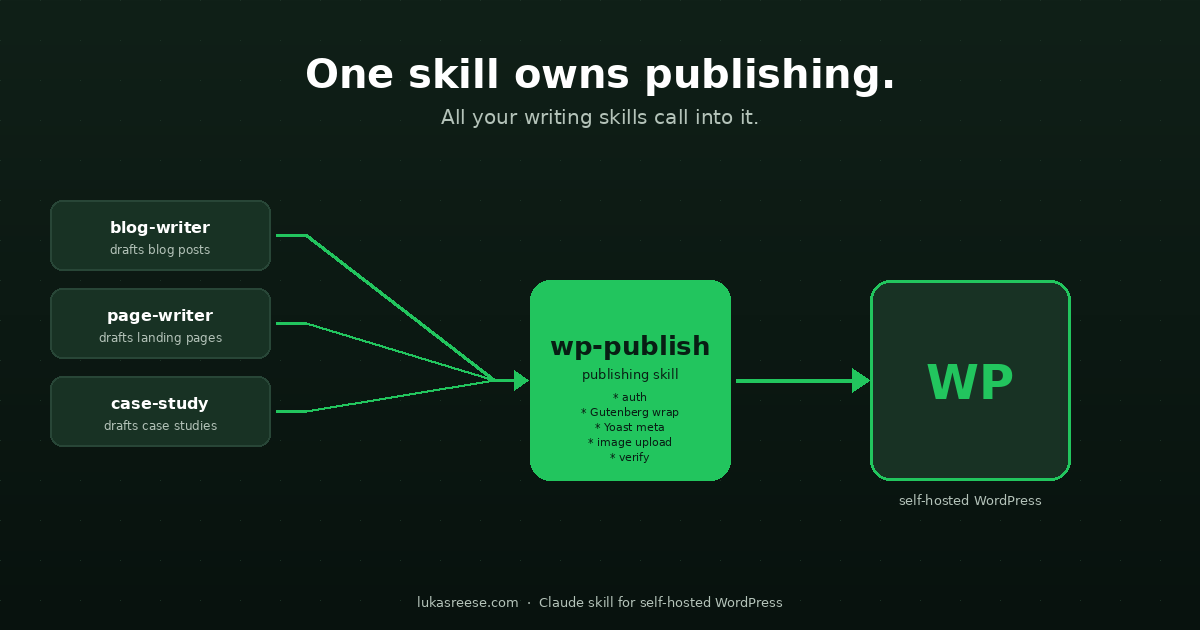
A Claude skill WordPress publishers can install in one click is the architectural unlock most AI publishing pipelines miss. Specifically, instead of every writing skill reimplementing authentication, the Gutenberg wrap, draft-status logic, and Yoast meta writes, one publishing skill owns all WordPress logic. As a result, the writing skills focus on writing.
This post explains the centralized publishing-skill pattern, what the skill handles automatically, how to install it in Claude Code or Cowork, and the real numbers it produced on a 1,057-issue audit cleanup. Furthermore, it ends with an honest scope list so you know exactly what the skill does and does not solve.
A Claude skill is a Markdown playbook plus optional scripts that any Claude environment can load. In other words, a skill that owns WordPress publishing handles auth, the Gutenberg wrap, Yoast meta via REST, image upload, and verification — so writing skills never touch the WP API. As a result, every writing skill becomes simpler, and every WP fix only needs to ship once.
What a Claude skill actually is
A Claude skill is a structured folder containing one Markdown file (SKILL.md) and optionally a references/ folder with deeper docs and a scripts/ folder with executable code. As a result, when you install the skill into Claude Code, Claude Cowork, or Claude Desktop, Claude reads the SKILL.md the first time the user mentions a matching trigger phrase. Specifically, the skill description tells Claude when to load it, and the body tells Claude what to do once loaded.
A Claude skill is a self-contained Markdown playbook (plus optional scripts) that any Claude environment can install. Furthermore, the skill activates automatically based on natural-language triggers in the conversation, so the user never has to remember which command to run.
How a skill differs from an MCP server
The two are often confused. In particular, an MCP (Model Context Protocol) server is a separate process that exposes live tools to Claude over stdio or HTTP. Conversely, a skill is just files Claude reads at conversation time. Specifically, MCP servers are great for live data sources (a database, a calendar, a Slack workspace). Skills are great for codified workflows (publish a blog post, refresh a dependency graph, run an audit). As a result, the two complement each other — a skill can call an MCP server, and an MCP server can be wrapped by a skill.
The centralized publishing-skill pattern
Every team that builds AI publishing pipelines hits the same problem. Specifically, each writing skill (one for blog posts, one for landing pages, one for case studies) ends up reimplementing the same WordPress logic: authentication, the Gutenberg wrap, draft-versus-publish status, Yoast meta payload, image upload, verification. Furthermore, when the Cloudflare User-Agent header changes or the Yoast plugin updates, you have to fix every writing skill in lock-step.
The centralized publishing skill solves this. In other words, one skill owns every WordPress operation, and all writing skills hand off to it at their publish step. As a result, the writing skill no longer cares whether the post goes to WordPress, Substack, or a static site. It only cares about producing good content.
The flow at a glance
writing skill (mkt-* or your own)
    |
    | hand off (HTML body, slug, meta, status)
    v
publishing skill (this one)
    |
    +--> auth (HTTP Basic + Cloudflare-safe UA)
    +--> extract body between markers
    +--> strip change-tracking comments
    +--> wrap in <!-- wp:html --> block
    +--> POST to /wp-json/wp/v2/posts (atomic: body + meta + status + featured_media)
    +--> GET back, verify wrap + meta + markers
    |
    v
WordPress (self-hosted .org)
The arrow only goes one way. Specifically, the writing skill does not know how the WP API works; the publishing skill does not know what content the post contains. As a result, you can swap either side without touching the other.
What the Claude skill WordPress publishers install does, and what it needs
This section answers three questions back to back: what the skill does, what it requires from your site, and what its output looks like. As a result, you can decide in two minutes whether it fits your stack — before installing anything.
What it does (six capabilities)
1. Authenticate. HTTP Basic Auth with an Application Password, plus a real browser User-Agent header so Cloudflare does not block the request with a 1010 error.
2. Create or update posts. One atomic POST writes the body, status, featured image, categories, tags, and Yoast meta in a single request.
3. Write Yoast SEO meta. Meta description, focus keyword, additional keyphrases (Yoast Premium), SEO title, and canonical URL — all via REST, in the same call as the body.
4. Upload images. Two-step pattern: bytes first, then PATCH metadata (alt text, caption, description) in a separate call. Survives the silent-no-op bug in single-step uploads.
5. Verify by read-back. After every push, the skill reads the post back and asserts the wrap is present, the modified timestamp is now, and the Yoast values landed in wp_postmeta.
6. Default to draft. Every new post is created as a draft. Going live requires the words “publish” or “go live” in the same message — the skill never publishes implicitly.
What you need (three prerequisites)
1. A self-hosted WordPress site. Self-hosted .org only. WordPress.com (managed Automattic) uses a different REST API and a different auth flow and is out of scope.
2. An Editor-role user with an Application Password. Generated in WP admin → Users → Profile → Application Passwords. The skill never touches the user’s real password — only the 24-character app password. Step-by-step instructions for creating the password and the Cloudflare User-Agent fix live in the Connect WordPress to Claude via REST API tutorial.
3. The Code Snippets PHP that registers Yoast meta fields with show_in_rest: true. Twenty-two lines, installed via the free Code Snippets plugin (1M+ active installs). Without it, Yoast meta writes silently no-op — the skill warns you when this happens. The full snippet plus a safer-than-functions.php walkthrough is in the Code Snippets WordPress tutorial.
The first time you activate the skill, it walks you through these prerequisites conversationally. In other words, it asks for the site URL, your username, and the Application Password (with step-by-step instructions for generating one). Furthermore, it then runs a live sanity check against your site — confirms the REST API is reachable, your user has Editor capability, and the Yoast snippet is active. As a result, you go from “skill installed” to “first draft posted” in roughly five minutes.
What the output looks like
Every post created or updated by the skill ships with its body wrapped in a Gutenberg HTML block. Specifically, the wrap is <!-- wp:html --> ... <!-- /wp:html --> — a Custom HTML block that the WordPress block editor leaves alone on every save round-trip. As a result, your custom CSS, callout boxes, and JSON-LD schema survive every editor save without being fragmented or re-parsed.
<!-- wp:html -->
<style>
  .post-XX-wrap h2 { ... }   /* scoped to the article wrapper */
</style>

<div class="post-XX-wrap">
  <p class="lede">Your article body lives here ...</p>
  ...
  <script type="application/ld+json">{ ... }</script>
</div>
<!-- /wp:html -->
Two consequences. First, your inline CSS lives inside the block, scoped to a per-post wrapper class so it cannot leak into the WordPress theme’s header or sidebar. Second, anyone editing the post in the block editor sees a single Custom HTML block they can edit safely — not a fragmented mess of paragraph and heading blocks. In other words, the output is round-trip-safe by design.
The seven production quirks the skill bakes in
Beyond the six capabilities and three requirements above, the skill bakes in seven production-only quirks that cost hours to debug if you hit them yourself. Specifically, each of these is a one-line fix once you know about it — and a half-day of head-scratching if you do not.
| Problem | When it bites | Baked-in fix |
|---|---|---|
| Cloudflare returns HTTP 1010 on the default Python user-agent | First REST call to most production sites | Real browser User-Agent header on every script |
| Block editor fragments custom HTML on every save | Every save round-trip after the first push | Mandatory <!-- wp:html --> Gutenberg wrap |
| Yoast meta fields are not REST-writable by default | First time you try to automate meta description | Code Snippets PHP that registers Yoast fields with show_in_rest |
WP KSES strips <details class="..."> for Editor role | First FAQ accordion you push as non-Admin | Bare-tag pattern + descendant-selector CSS |
media POST silently ignores alt / caption / description | First image upload | Two-step pattern: bytes first, metadata in a separate PATCH |
| New post accidentally goes live | First time you forget the status flag | Draft-by-default + per-message publish approval gate |
| Push appears successful but content did not land | Post-cache, post-Cloudflare staging | verify_post.py reads back and asserts the wrap, the timestamp, the Yoast meta, and any expected markers |
The headline feature: Yoast meta in one POST
Until recently, writing Yoast SEO meta required a manual paste into the WP admin Yoast box after the API push. Specifically, Yoast does not expose its meta fields through the REST API by default, so writes to _yoast_wpseo_metadesc, _yoast_wpseo_focuskw, and friends silently no-op. As a result, every automated pipeline ended with a human clicking through WP admin to paste meta.
The fix is a 22-line PHP snippet installed via the Code Snippets plugin. Furthermore, that snippet registers each Yoast field with show_in_rest: true, so the standard REST meta field becomes the write path. The skill ships with the snippet inside references/yoast-meta.md and warns you when an empty Yoast field is detected after a push — a clean signal that the snippet is missing. The full pattern plus the additional-keyphrases (Yoast Premium) extension is documented in Automate Your Yoast Meta Description.
# one POST writes the body, status, featured image, and ALL Yoast meta
import requests
auth = ("claude-bot", APP_PASSWORD)
headers = {"User-Agent": "Mozilla/5.0 (Windows NT 10.0; Win64; x64) ..."}
payload = {
    "status": "draft",
    "content": gutenberg_wrapped_body,
    "featured_media": media_id,
    "meta": {
        "_yoast_wpseo_metadesc":      "Short, keyphrase-led, under 135 chars.",
        "_yoast_wpseo_focuskw":       "claude skill wordpress",
        "_yoast_wpseo_focuskeywords": '[{"keyword":"automate WordPress publishing AI","score":""}]',
        "_yoast_wpseo_title":         "Custom SEO title (optional)",
    },
}
r = requests.post(WP + "/wp-json/wp/v2/posts", auth=auth, headers=headers, json=payload)
r.raise_for_status()
That single call replaces five WP-admin tabs and ninety-six form fields per post. By contrast, the manual flow burns thirty seconds per post on copy-paste alone, so a fifty-post batch becomes a half-hour click-through that the API does in twenty seconds.
Want to level up your Python and WordPress automation skills?
DataCamp offers structured, hands-on courses in Python, SQL, and data engineering — the exact toolkit behind the AI plus REST API workflow this skill packages. Specifically, new users get a significant discount on their first subscription.
Explore DataCamp Courses →How to install it in Claude Code, Cowork, and Desktop
The skill is a standard Anthropic Agent Skill bundle. Specifically, the same artifact installs into Claude Code, Claude Cowork, and Claude Desktop because all three read the same SKILL.md format. Furthermore, the install path differs per environment, but the skill itself is identical across all three.
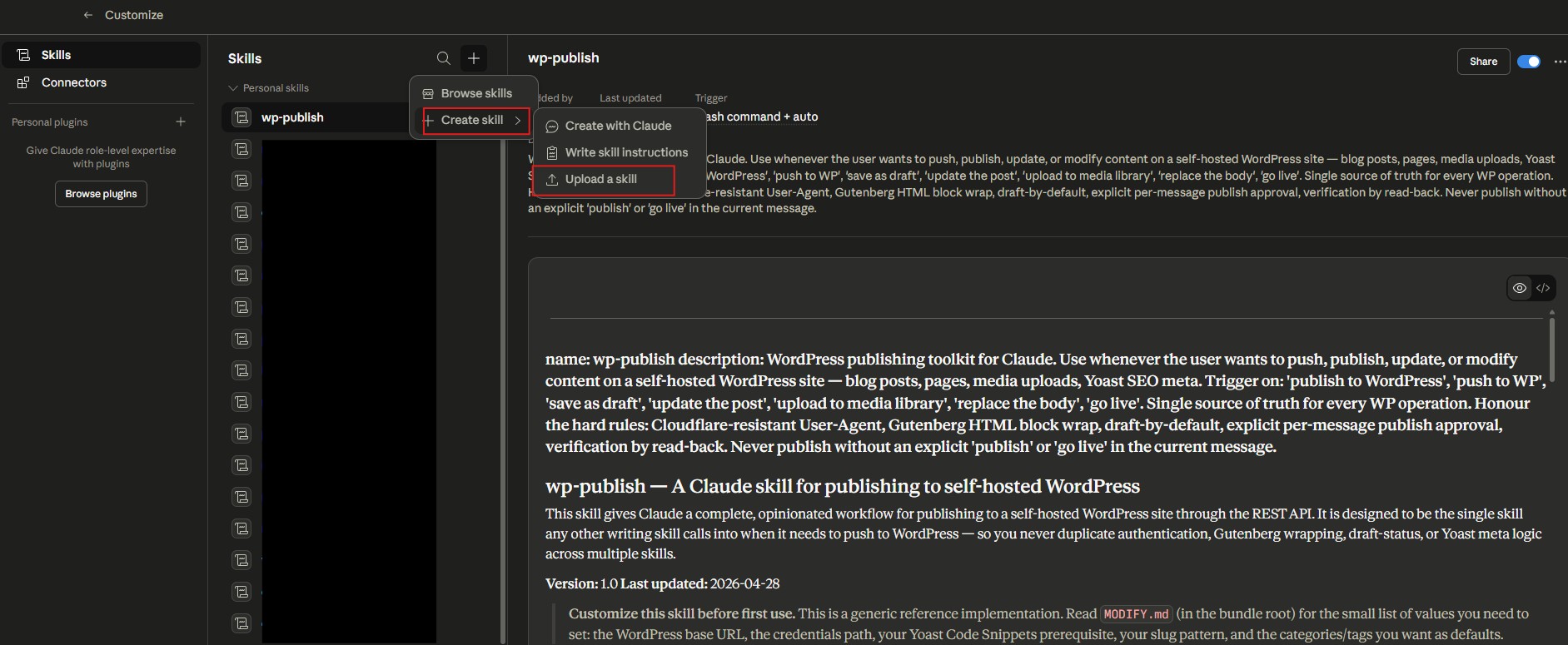
Claude Cowork (recommended for non-developers)
Open Cowork and go to Settings → Customize → Skills. Click + Add skill, choose Install from file, and upload the .skill archive. As a result, the skill appears in the Skills list with a toggle. Likewise, toggling it off disables the skill without uninstalling.
Claude Code (developers)
Drop the entire skill folder into ~/.claude/skills/wp-publish/ for user-scoped install, or into <your-repo>/.claude/skills/wp-publish/ for project-scoped install. Furthermore, restart Claude Code so it re-scans the skills directory.
Claude Desktop
Same path as Claude Code — drop the folder into ~/.claude/skills/ and restart. Specifically, the desktop app uses the same skill loader as the CLI.
Total time once you have an Application Password ready: roughly five minutes for someone who has installed a skill before, fifteen to thirty minutes for first-time users. In other words, the bottleneck is the first-run setup walkthrough, not the install itself.
First-run setup and a 60-second test
The first time the skill activates in a Claude conversation, it asks for three things in plain language: your WordPress site URL, your username, and an Application Password. Specifically, it walks you through generating the Application Password inside WP admin (Users → Profile → Application Passwords), waits for you to paste it, and saves all three values to a single JSON file. As a result, you never have to find the credentials path or hand-edit a config file.
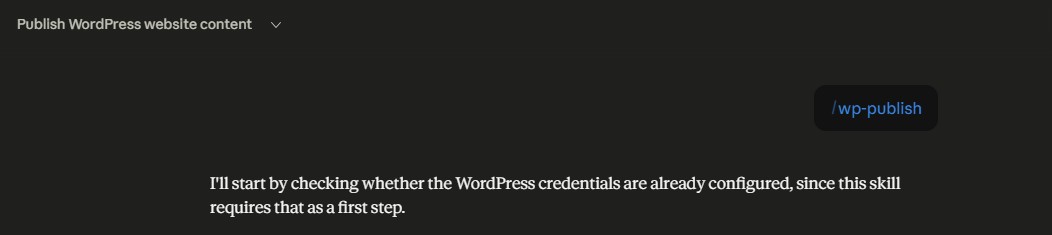
Furthermore, the skill then runs a live sanity check against your site. In particular, it hits three endpoints: the REST API root (confirms Cloudflare is not blocking), /users/me (confirms authentication and that your user has Editor capability), and one recent post in edit context (confirms whether the Yoast Code Snippets prerequisite is active). As a result, you find out the moment you have a misconfiguration — not when the first publish silently fails.
After setup, the simplest sanity check is a read-only call. Specifically, ask Claude: “Find the post with slug hello-world on my WordPress site.” The skill returns the post ID, status, and edit URL. The next step is a write test that stays safe: ask Claude to “save a tiny test post as a draft — just one paragraph that says ‘test draft from wp-publish.’” As a result, you have a draft you can delete from WP admin in one click.
Real numbers from the 1,057-issue cleanup
This skill was extracted from a real session that turned a 1,057-issue Ahrefs Site Audit into a three-hour cleanup. Specifically, it ran every WP operation in that audit cleanup, and each operation type now has its own deep-dive post. As a result, the table below cross-references each volume to the specific workflow post that explains the underlying technique.
| Operation | Volume in the case study | Manual estimate |
|---|---|---|
| Meta descriptions written via Yoast REST | 24 in one batch | ~12 minutes of WP admin clicks |
| 301 redirects added through the skill | 27 | ~14 minutes in Yoast Premium UI |
| 404 errors patched (URL replacements + redirects) | 16 | ~10 minutes of grep + edit |
| Images compressed to WebP and re-uploaded | 12 (5.2 MB removed) | ~30 minutes of manual upload |
| Health score change | 78 → 81 | — |
Furthermore, every operation went through the same skill. Specifically, no writing skill needed to know how the WordPress API worked, and no WP-side bug touched more than one file. As a result, when the Cloudflare User-Agent rule needed to change mid-session, fixing it in one place benefitted every downstream operation.
What is NOT yet in scope
Honest list of limits. In particular, naming what the skill does not do is just as important as naming what it does. Furthermore, several of these are deferred by design rather than missing — they are not blockers for the typical use case.
- Yoast SEO score recompute. The numeric score (
_yoast_wpseo_linkdex) is computed by Yoast’s JavaScript at editor save. Specifically, posts edited via REST alone have an empty score until a human opens the editor and clicks Update. There is no public server-side API for this. - Comment moderation. Out of scope for v1.
- XML-RPC fallback. Not used. In effect, REST only — for security and simplicity.
- WordPress.com (managed Automattic). Different REST API, different auth flow. Self-hosted
.orgonly. - Yoast Premium redirects. The endpoint exists and works. Likewise, the modify guide shows you how to add it as a flag in roughly ten lines of code. Not wired in by default.
- Automated KSES whitelist for Editor role. The skill emits HTML that survives KSES out of the box. As a result, you can keep richer accordion classes only by adding a Code Snippets PHP filter — documented, but optional.
Specifically, every limit above is a deliberate trade-off, not an oversight. In other words, the goal of v1 was a small, reliable surface area. Furthermore, additions land as new flags rather than rewrites, so upgrading is one-step.
How to get it (early-access launch)
The branded version that runs on this site stays in my own stack. Specifically, the generic, brand-agnostic version — packaged with a README, a modification guide, and the production fixes baked in — is on LemonSqueezy. As a result, you can install it, customize the six values that point at your own site, and start publishing in under thirty minutes.
Get the wp-publish skill
One-time payment. No subscription. Generic, customizable, ready for Claude Code, Cowork, or Desktop.
Get the skill →The bundle includes the .skill archive, a README with install steps for all three Claude environments, a step-by-step MODIFY.md covering every customization point, and the Yoast Code Snippets PHP file. Furthermore, the refund window is fourteen days, no questions, through LemonSqueezy — the intent is to remove the buy-and-regret risk for a piece of technical infrastructure.
Where to go next
The skill anchors a wider workflow on this site. Specifically, the rest of the cluster covers each piece in detail:
- The pillar — how the 1,057-issue audit got cleaned up in three hours
- Foundation 1A — how to connect WordPress to Claude via the REST API
- Foundation 1B — the Code Snippets plugin tutorial that makes Yoast meta REST-writable
- Spoke — the Ahrefs triage workflow this skill executes
- Spoke — the Yoast meta description automation this skill packages
- Spoke — bulk image compression to WebP via the same skill
- Spoke — Yoast Premium redirects through the REST API
External references for the technical foundation: the Anthropic Agent Skills documentation for the skill format, the WordPress REST API Handbook for the endpoint reference, and the Code Snippets plugin page for the prerequisite that unlocks Yoast meta writes.
Frequently asked questions
What is a Claude skill, and how is it different from an MCP server?
A Claude skill is a Markdown playbook (plus optional scripts) that any Claude environment loads when a matching trigger phrase appears. Specifically, it is files Claude reads at conversation time. By contrast, an MCP server is a separate process that exposes live tools to Claude over stdio or HTTP. In effect, skills are great for codified workflows; MCP servers are great for live data sources. As a result, the two complement each other.
Do I need WordPress.com or self-hosted WordPress?
Self-hosted (.org) only. Specifically, WordPress.com (the managed Automattic platform) uses a different REST API and a different authentication flow. As a result, this skill is out of scope for WP.com sites and works only against the self-hosted WordPress install most readers actually have.
Can the skill write Yoast meta descriptions via REST?
Yes — with one prerequisite. Specifically, Yoast does not expose its meta fields through the REST API by default. Furthermore, the skill ships with a 22-line PHP snippet (installed via the free Code Snippets plugin) that registers _yoast_wpseo_metadesc, _yoast_wpseo_focuskw, and related fields with show_in_rest: true. Once active, every Yoast meta field is writable in the same POST as the body.
How does the skill authenticate without leaking credentials?
The skill reads credentials from a single JSON file at a configurable path (default ~/.config/wp-publish/credentials.json, overridable with WP_PUBLISH_CREDENTIALS). Specifically, the SKILL.md never contains credentials — it only points at the file. As a result, you can share the skill folder publicly without exposing anything, and rotating the application password means editing one JSON file.
Will the skill publish posts directly, or only drafts?
Drafts by default. In particular, going live requires the words “publish” or “go live” in the same message that requests the action. Furthermore, “we agreed earlier” never counts — the approval has to be in the current request. As a result, the skill is safe to wire into automated pipelines without risk of accidentally publishing.
How is this different from Claude Cowork’s official WordPress plugin?
The official Cowork plugin is a WordPress plugin that lives inside WP and exposes Cowork-specific tools. Specifically, this skill is a Claude-side artifact that runs against any self-hosted WordPress site over the standard REST API. Furthermore, the two are complementary — the official plugin is the right tool if you want a bidirectional editing workflow inside WP, and this skill is the right tool if you want centralized publishing logic that any writing skill can call into.
— Lukas