
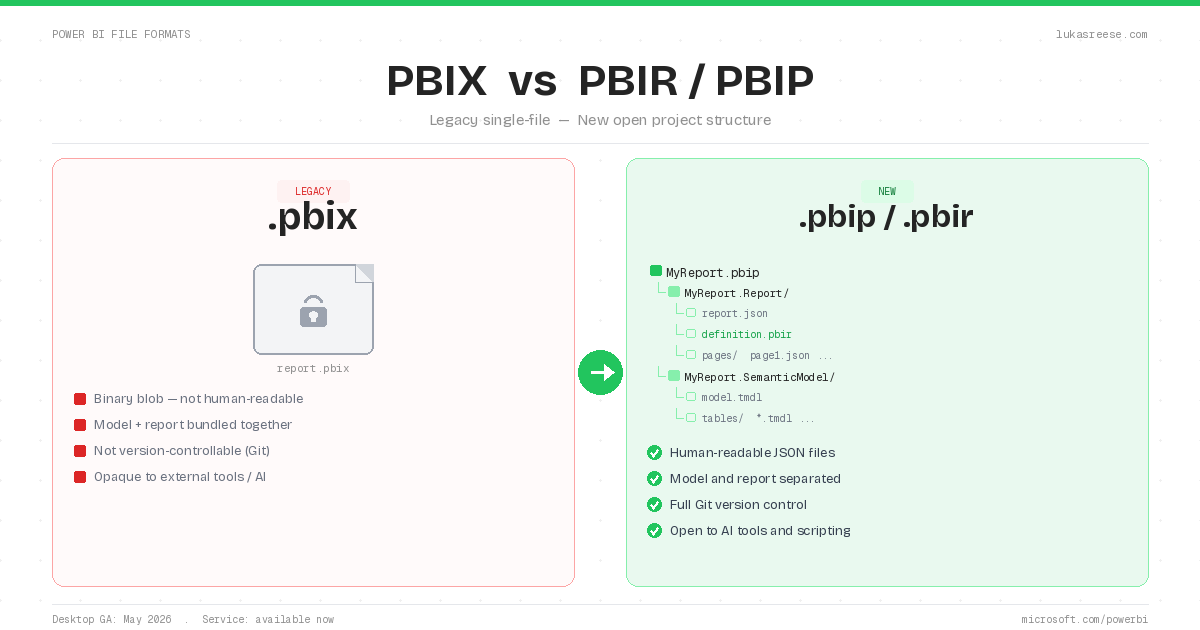
The PBIX vs PBIR debate is settled: Microsoft has made PBIR the default Power BI report format, and the Power BI Project (PBIP) format is generally available since September 2026. Specifically, the Power BI Service switched new reports to PBIR in January 2026, and Power BI Desktop followed with the GA release that rolls out mid to late September 2026. However, the transition still introduces a third format, PBIP, that gets confused with PBIR, even though the two serve completely different roles. To make the difference concrete, this guide also comes with a real PBIP project you can download: one report page, 50 visuals, 58 JSON files, 12 tables and 49 measures.
In this guide, I break down exactly what each format does, how they relate to each other, and what the PBIX vs PBIR transition means for your existing reports and workflows. Additionally, I cover what actually breaks when you switch, something most other guides skip entirely.
Key Takeaways
- PBIX is the legacy single-file format. It still works today, but Microsoft is phasing it out as the default.
- PBIR is the new report format: human-readable JSON folders instead of a binary blob. It enables Git, CI/CD, and AI-assisted report building.
- PBIP is not a report format. It is the project container that holds PBIR (the report) plus TMDL (the semantic model). Think of PBIP as the folder, PBIR as the report file inside it.
- Power BI Service switched to PBIR by default in January 2026. Since September 2026, PBIP is generally available and PBIR is the default in Power BI Desktop too, so the transition is no longer optional.
- Most existing PBIX users will experience the PBIX vs PBIR transition silently. However, developers using source control, CI/CD, or AI tools have the most to gain from switching now.
The 60-second version. If you only want the distinction between the three formats, this covers it.
Download a real PBIP project (free)
Reading about the folder structure is one thing. Opening one is faster. I put a complete Power BI project online as a PBIP: one report page, the PBIR definition folder with pages and visuals as JSON, the TMDL semantic model with 12 tables and 49 measures, 50 visuals in 58 JSON files, and the .platform files that make it open in Power BI Desktop with data. Every visual on the page was built with Claude Code, so you also see what AI-authored PBIR looks like in practice.
Subscribe below and the download link arrives right after you confirm your email. Unsubscribe any time, the file stays yours.
PBIX vs PBIR vs PBIP: Quick Definitions
Before comparing PBIX vs PBIR, it helps to understand what each format actually is and why PBIP fits into the picture. Each solves a different problem, and understanding that distinction makes the whole transition make sense.
PBIX: Power BI Desktop File
PBIX (Power BI Desktop file) is the traditional single-file format that has been the standard for Power BI development since the product launched. It stores the data model, Power Query transformations, report visuals, and data connections all in one compressed binary file. Consequently, it is simple to share: one file, one report, done.
However, because PBIX is a binary file, it cannot be meaningfully diffed in Git. Two developers editing the same PBIX simultaneously will always produce a merge conflict with no good resolution. That limitation is the core reason PBIR exists.
PBIR: Power BI Enhanced Report Format
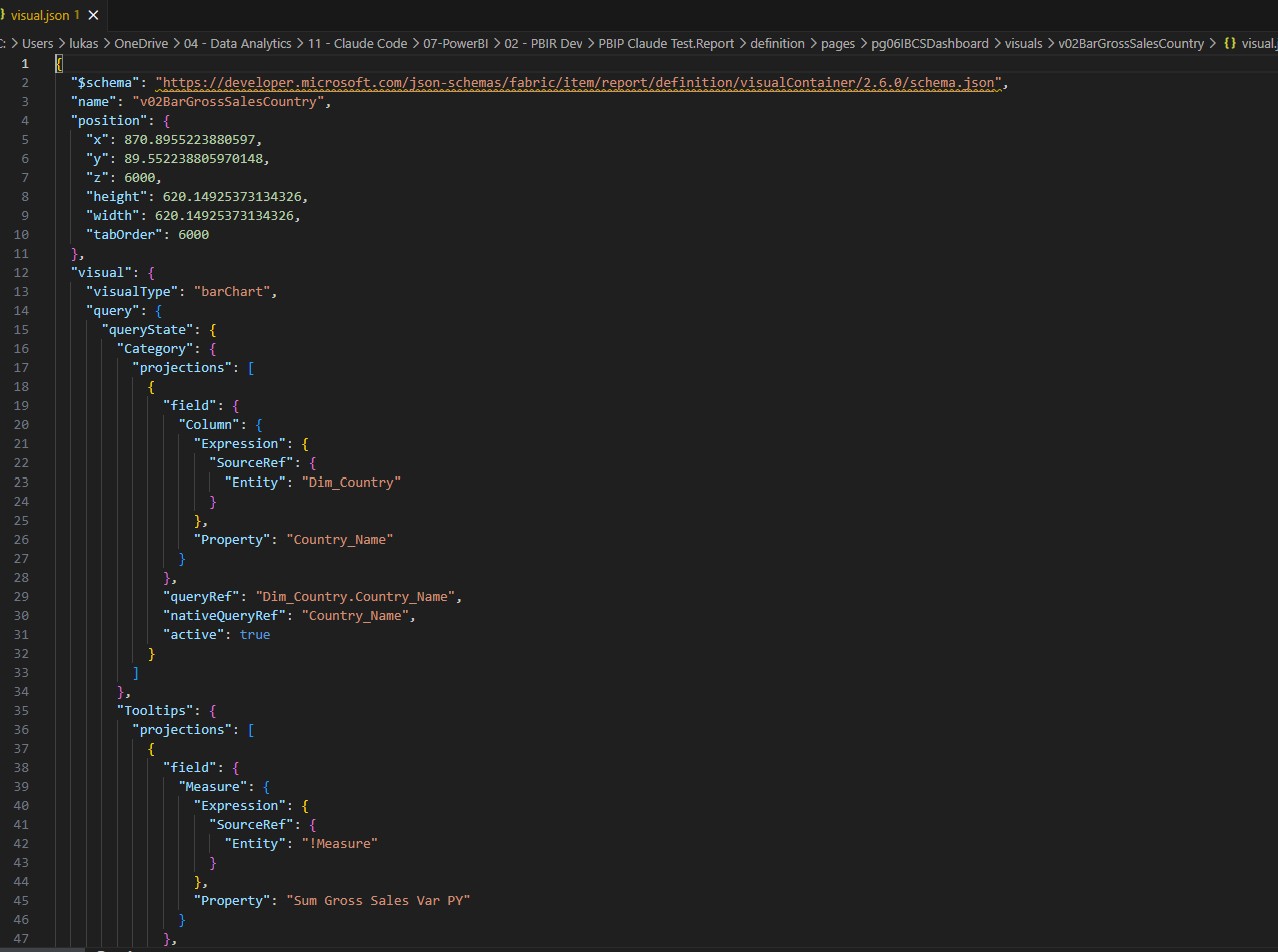
PBIR (Power BI Enhanced Report Format) replaces the binary PBIX report layer with a folder of human-readable JSON files. Specifically, each visual, each page, each bookmark, and each report setting becomes its own JSON file that can be read, edited, and version-controlled like any other code. As a result, PBIR enables proper Git integration, CI/CD pipelines, and, critically, AI-assisted report building directly from the file structure.
For a deeper technical breakdown of what PBIR contains, see my complete guide to the PBIR format.
PBIP: Power BI Project
PBIP (Power BI Project) is not a report format at all. It is a project container. A PBIP project holds two things: the PBIR report folder and the TMDL semantic model definition. In other words, PBIP is the outer wrapper, and PBIR is one of the components inside it.
“PBIP is the container. PBIR is the report. TMDL is the model. These three things together replace the single PBIX file, and once you understand that relationship, the whole PBIX vs PBIR transition makes sense.”
What is a PBIX file and how do you open it?
A PBIX file is the file Power BI Desktop saves by default: one compressed file with the .pbix extension that holds the report pages, the semantic model, the Power Query steps and, for import models, a copy of the loaded data. In other words, everything a report needs travels in a single file, which is why PBIX has been the format people email, upload and archive since 2015.
You open a PBIX file with Power BI Desktop, which is free from the Microsoft Store. Additionally, you can upload a PBIX file to the Power BI Service through Upload in a workspace, and Fabric will host it as a report plus a semantic model. However, there is no viewer for PBIX outside of Power BI: Excel, a browser or a text editor cannot open it in a useful way.
Technically, a PBIX file is a ZIP archive. Consequently, if you rename it to .zip you can look inside, and you will find a DataModel file, a Report folder and a few metadata files. Nevertheless, the report definition in that archive is a single Layout file that is not meant to be edited by hand, and the model is stored in a compressed binary. That is exactly the gap PBIR and PBIP close: the same content, saved as readable text files in a folder.
“A PBIX file is a ZIP archive with a binary model and one report layout inside. A PBIP project is the same report saved as a folder of text files. Nothing about the report changes, only how it is stored.”
PBIX vs PBIR vs PBIP: Side-by-Side Comparison
The table below compares PBIX (the old format) against PBIR/PBIP (the new format). PBIR and PBIP are not alternatives: PBIR is the report layer, PBIP is the project container that holds it. Together they replace what PBIX did as a single file.
| Feature | PBIX (Old) | PBIR / PBIP (New) |
|---|---|---|
| What it is | Single compressed binary: model, report, and connections in one file | Project folder (PBIP) containing the report as JSON files (PBIR) + model as text (TMDL) |
| Human-readable | ❌ Binary: not readable in any text editor | ✅ Plain JSON + TMDL: open in VS Code or Notepad |
| Git / version control | ❌ Binary diff: merge conflicts are unresolvable | ✅ Line-level diffs: proper branching, PRs, and merging |
| CI/CD pipelines | ❌ No clean automated deployment path | ✅ Fully supported via Azure DevOps or GitHub Actions |
| AI / LLM-buildable | ❌ Binary is opaque: AI cannot read or write it | ✅ JSON is readable and writable by LLMs like Claude |
| Multi-developer work | ❌ One developer at a time: overwrite risk | ✅ Work on separate pages/visuals simultaneously |
| Default (2026) | ❌ No longer default from 2026 | ✅ Service: Jan 2026 · Desktop and GA: Sep 2026 |
| Enable early (Desktop) | Not applicable | File → Options → Preview features → “Store reports using enhanced metadata format (PBIR)” |
| Best for | Quick solo reports, simple sharing, legacy workflows | Teams, Git workflows, CI/CD, AI-augmented development |
PBIX: The Format Before PBIR
PBIX has been the standard Power BI file format since 2015. For most individual developers and small teams, it has worked fine: open Desktop, build the report, save the file, publish to the service. That workflow is not going away overnight. However, the PBIX vs PBIR difference becomes most apparent the moment a second developer touches the same file.
What happens to existing PBIX files
According to Microsoft’s official PBIR transition announcement, existing PBIX users will experience the change as completely silent. Specifically, when a PBIX-based report is edited and saved in the Power BI Service after the cutover date, the service automatically upgrades it to use PBIR report metadata behind the scenes. The file extension and the workflow remain the same for the end user. However, the internal structure changes.
That said, there is one important size restriction. As of March 2026, automatic upgrades in the service only apply to reports with fewer than 100 visuals. Reports exceeding that threshold require a manual migration step.
When PBIX Still Makes Sense Over PBIR
For quick, self-contained reports that will never be version-controlled or shared across a development team, PBIX remains a perfectly valid choice. Moreover, if you are working in Power BI Desktop today and not using source control, you will not notice any meaningful difference in your day-to-day workflow, even though Desktop switched to PBIR as the default format in September 2026.

PBIR: The New Report Format (And Why It Changes Everything)
PBIR is the most significant change to Power BI’s file architecture since the product launched. Instead of storing report metadata in a compressed binary file, PBIR saves every component of a report as a separate, human-readable JSON file. Furthermore, this structural change has implications far beyond version control.
The PBIR folder structure
A PBIR report folder contains individual files for each report page, each visual configuration, bookmarks, filters, and report-level settings. Specifically, a typical PBIR folder looks like this:
MyReport.Report/
├── definition/
│   ├── report.json          ← Report-level settings
│   ├── pages/
│   │   ├── ReportPage1/
│   │   │   ├── page.json    ← Page metadata
│   │   │   └── visuals/
│   │   │       ├── Visual1/
│   │   │       │   └── visual.json  ← Visual config
│   │   │       └── Visual2/
│   │   │           └── visual.json
│   └── bookmarks/
│       └── bookmark.json
└── .platform
In practice, this means every change you make in Desktop results in a meaningful file change that Git can track line-by-line. As a result, pull requests, code reviews, and branching strategies all become viable for Power BI development, something that was essentially impossible with PBIX.
Why PBIR (Not PBIX) Unlocks AI-Assisted Report Building
This is the angle most other PBIR guides miss entirely. Because PBIR is plain JSON, large language models can read, write, and modify report files directly. In my own work, I have been using Claude to generate PBIR report pages from scratch, providing a schema context and getting complete visual configurations back as JSON files that open correctly in Desktop.
“PBIX was a black box. PBIR is a transparent structure. That transparency is what makes AI-assisted Power BI development possible: the AI can read the format, understand it, and write to it.”
For a practical example of this in action, see how I used AI to build a Power BI report from scratch using PBIR. Additionally, the PBIR report builder Claude skill automates exactly this workflow for repeatable report generation.
PBIP: The Project Container (Not a Report Format)
PBIP is the one format that consistently causes confusion, largely because its name suggests it is a report format when it is actually a project structure. Specifically, a PBIP project is a folder that contains two separate components: the PBIR report definition and the TMDL semantic model definition. Together, they make up what a PBIX file previously bundled into one binary.
The PBIP folder structure
MyProject.pbip                    ← The entry point file
MyProject.SemanticModel/          ← The data model (TMDL)
│   definition/
│   ├── model.tmdl
│   ├── tables/
│   │   ├── Sales.tmdl
│   │   └── Date.tmdl
│   └── relationships.tmdl
MyProject.Report/                 ← The report (PBIR)
    definition/
    ├── report.json
    └── pages/
        └── ...
In other words, PBIP separates the report from the model at the file system level. This separation has a major practical benefit: multiple reports can reference the same semantic model folder, and the model can be version-controlled independently from any individual report. For team workflows, this is a significant advantage over PBIX where model and report are always fused together.
For more on the semantic model side of PBIP, my TMDL guide for Power BI semantic modeling and version control covers the model layer in depth.
PBIP is not a format you can open directly in Power BI Desktop like a PBIX file. You open the .pbip entry-point file, which points Desktop to the folder structure. If you move or rename the subfolder components without updating the .pbip file, Desktop will not be able to locate the project.
Want to open a real one? The free PBIP project above has the full folder structure, ready for Power BI Desktop.
How the PBIX vs PBIR Transition Works (2026 Timeline)
The PBIX vs PBIR migration rolled out in stages, and the dates moved more than once. According to Microsoft’s PBIR transition announcement, the plan had three phases: the Service first, Desktop second, and general availability last. Here is what actually happened.
Phase 1: Power BI Service (from January 25, 2026)
All new reports created in the Power BI Service use PBIR by default since January 25, 2026. Additionally, existing service reports are upgraded to PBIR automatically when they are edited and saved, provided they have fewer than 100 visuals. Microsoft paused and re-enabled this rollout once during spring, and the June 2026 feature summary confirmed it was back on.
Phase 2: Power BI Desktop (planned for March, delivered in September 2026)
Desktop was originally scheduled to switch to PBIR by default in March 2026, then in May, then in July or August, as the June 2026 feature summary stated. In the end, the switch arrived together with general availability. For developers working primarily in Desktop, the September 2026 release is therefore the version to look for.
Phase 3: General availability (September 2026)
In early September 2026, Microsoft announced to tenant admins that Power BI developer mode and the PBIP format are generally available, that PBIR is the default report format in Desktop and in the Service, and that the rollout runs from mid to late September 2026 across all clouds. As a result, reports still stored in PBIR-Legacy convert to PBIR automatically the next time they are edited in a Power BI tool, and the tenant setting that let admins opt in early is removed because PBIR is no longer optional. Notably, Microsoft lists no action required, apart from updating CI/CD guidance for teams that export report definitions.
| Date | What changed | Impact on you |
|---|---|---|
| January 25, 2026 | Power BI Service switches new reports to PBIR | New service reports use PBIR. Existing reports upgrade on the next edit and save. |
| March to August 2026 | Desktop default postponed twice (March, May, then July or August) | PBIR stays a preview checkbox in Desktop. Nothing changes for PBIX users yet. |
| Mid to late September 2026 | PBIP and developer mode reach general availability, PBIR becomes the default everywhere | PBIR-Legacy reports convert on the next edit. The opt-in tenant setting disappears. PBIX files still open. |
One thing has not changed: the .pbix extension stays. What changes is the report metadata inside the file, from PBIR-Legacy to PBIR. Accordingly, you can keep saving PBIX files after GA; they simply carry the new structure. The Microsoft Learn page on the enhanced report format still documents the preview checkbox, so on a Desktop build older than September 2026 you may still need to enable it by hand.
How to Convert PBIX to PBIP and PBIR in 5 Steps
Converting a PBIX file to a PBIP project takes a few minutes, and you do not lose anything in the process. Specifically, Power BI Desktop saves the same report and the same semantic model into a folder, and you can save it back to PBIX at any time. Here is the sequence I use.
- Update Power BI Desktop. Install the September 2026 release or newer, where PBIP is generally available. On an older build, go to File, Options and settings, Options, Preview features and tick Power BI Project (.pbip) save option and Store reports using enhanced metadata format (PBIR).
- Open the PBIX file as usual. Additionally, make a copy first if the report is the only version you have; the conversion is safe, but a backup costs nothing.
- Save as a project. Choose File, Save as, then the file type Power BI project files (*.pbip), and pick an empty folder. Desktop writes a .pbip file, a Report folder and a SemanticModel folder next to each other.
- Check the folder. Inside YourReport.Report/definition you will find one JSON file per page and per visual; inside YourReport.SemanticModel/definition you will find the TMDL files for tables, measures and relationships. Consequently, every future change shows up as a readable diff.
- Put it under version control. Run git init in the folder, commit, and connect the workspace with Fabric Git integration if your tenant allows it. From here, tools such as VS Code, CI/CD pipelines and AI agents can read and write the report directly.
The way back, and publishing
To go back, open the .pbip file in Desktop and choose Save as with the PBIX file type. Similarly, publishing works from either format: Publish in Desktop uploads the report and model exactly as before. If you want to see what a finished project looks like before you convert your own, the free PBIP project above is a complete one.
“Converting is one Save as. The work is not the conversion; it is deciding to treat a report like code from that day on.”
What Breaks in the PBIX vs PBIR Switch, and What Doesn’t
Most guides gloss over this section entirely. In practice, the PBIX vs PBIR migration is mostly smooth, but there are specific scenarios where things go wrong, and it is better to know about them before you hit them on a client project.
What works fine after the switch
In my testing across multiple projects, the following all work without issues after switching to PBIR: standard Power BI visuals, DAX measures and calculated columns, Power Query transformations, report themes (JSON), bookmarks, drill-through pages, row-level security, and deployment pipelines. For the vast majority of reports, the transition is genuinely transparent.
What can break or behave unexpectedly
Based on my experience working with PBIR on live projects, here are the areas that warrant extra caution:
- Large reports (100+ visuals): Automatic upgrades in the service only apply to reports below this threshold. Reports above it require a manual migration path.
- Third-party custom visuals: Most certified AppSource visuals work fine. However, older or uncertified custom visuals may have unexpected behaviour after the format switch. Test before deploying to production.
- Deployment pipeline configurations: If your existing CI/CD setup references PBIX file paths directly, those paths will change in a PBIP project structure. Update pipeline scripts accordingly.
- External tools using the PBIX format directly: Some third-party tools that read PBIX files as binary archives (for model extraction or documentation) may not yet support PBIR. Check your toolchain before migrating.
- Reports created in the service (thin reports): Reports created directly in the Power BI Service (without a corresponding Desktop file) behave differently in the PBIR transition. Always verify service-created reports after the upgrade window.
“The PBIX vs PBIR switch is not risky for most reports, but if you are running a complex enterprise model with hundreds of visuals, custom visuals, or external tooling, test in a development environment before the automatic upgrade reaches your production workspace.”
PBIX vs PBIR: When Should You Make the Switch?
The short answer: switch now if you are doing anything beyond solo report development. Specifically, if any of the following apply to your workflow, PBIR and PBIP will give you immediate, tangible benefits:
- You work in a team where more than one person edits the same report
- You use or want to use Git for version control on Power BI projects
- You are building CI/CD pipelines for report deployment
- You want to use AI tools (like Claude) to build or modify report JSON directly
- You need to document changes to report structure over time
On the other hand, if you are a solo developer building self-contained reports for a single client and not using source control, there is no urgent reason to change your workflow, since the September 2026 Desktop update converts the report format in the background anyway. In that case, the PBIX vs PBIR transition will simply happen in the background.
For a broader view of how AI tools are changing the Power BI development workflow, see my post on building a Claude skills starter kit for Power BI. Additionally, if you are starting fresh with PBIP projects and want a solid dashboard foundation, the Power BI Background Designer generates production-ready SVG backgrounds designed specifically for PBIP project structures.
FAQ
More questions about PBIX, PBIR and PBIP
Ready to work with PBIR?
This distinction matters more than ever now that agents can edit reports directly: the Power BI report authoring skill works only with PBIP projects, and the Power BI Desktop Bridge reads the PBIR files from disk.
My complete PBIR guide covers the full format spec, folder structure, and how to set up a PBIP project from scratch.
Read the Full PBIR Guide →Where to go next
Knowing the formats apart is the starting point. What you do with PBIR is the part that pays off.
- What is PBIR? The full guide: the format spec and folder structure in detail.
- Power BI report authoring skill: the official Microsoft skill that reads and writes PBIR.
- Power BI Desktop Bridge: how an agent reloads a report and checks its own work.
- Speed up Power BI report development: the five jobs worth automating once you are on PBIP.
About the author: Lukas Reese is a freelance Power BI developer and consultant specialising in advanced data modeling, IBCS-compliant dashboard design, and AI-augmented BI workflows. He works with clients across the US and DACH regions and has been working with PBIP and PBIR since the preview release. | Last updated: September 2026