
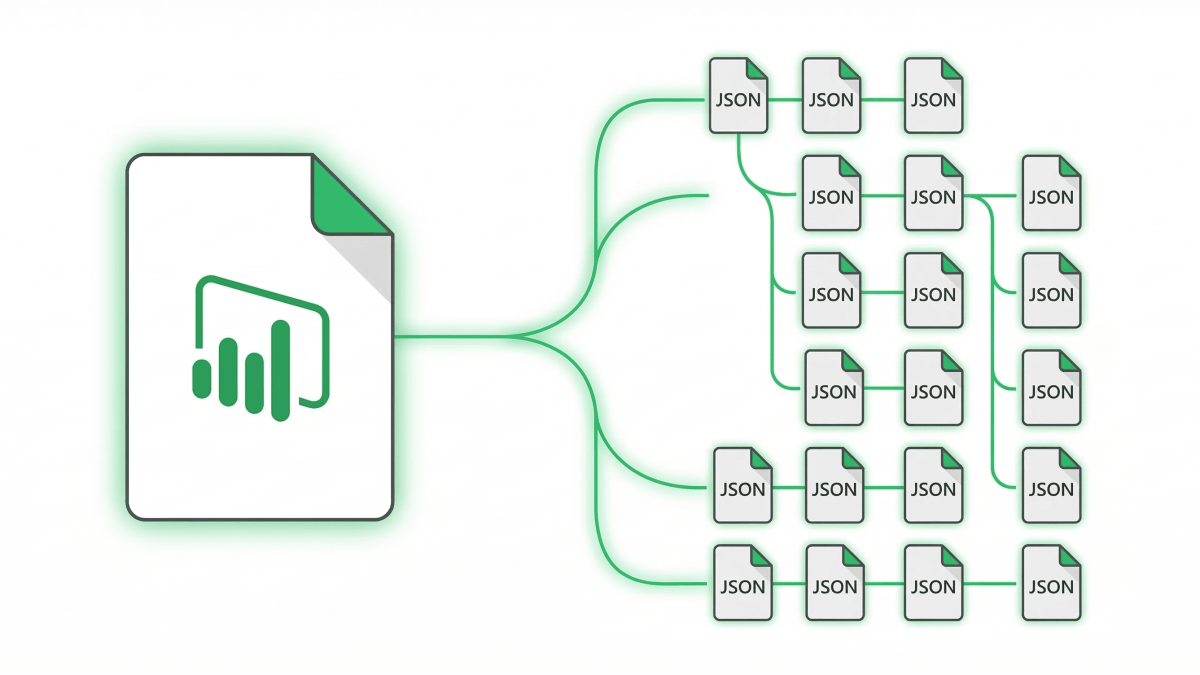
So, what is PBIR? PBIR, the Power BI Enhanced Report Format, is the way Power BI saves the report part of your work: every page, visual, and bookmark as its own small JSON file. As a result, reports become readable, diffable, and editable by scripts and AI agents.
In short, PBIR replaced the old single-file report format, now called PBIR-Legacy. Moreover, it is no longer a niche developer feature. In 2026 it became the default for new reports in the Power BI Service, and Power BI Desktop now saves PBIR inside PBIX files too. This guide covers what changed, how to enable it, and how to fix the most common PBIR error.
Last updated: September 27, 2026
See PBIR written by an AI agent
My free guide shows how Claude Code builds report pages in PBIR, and the PBIP file lets you open the result: 25 pages, 7 prompts you can copy.
How I Build Power BI Reports with AI
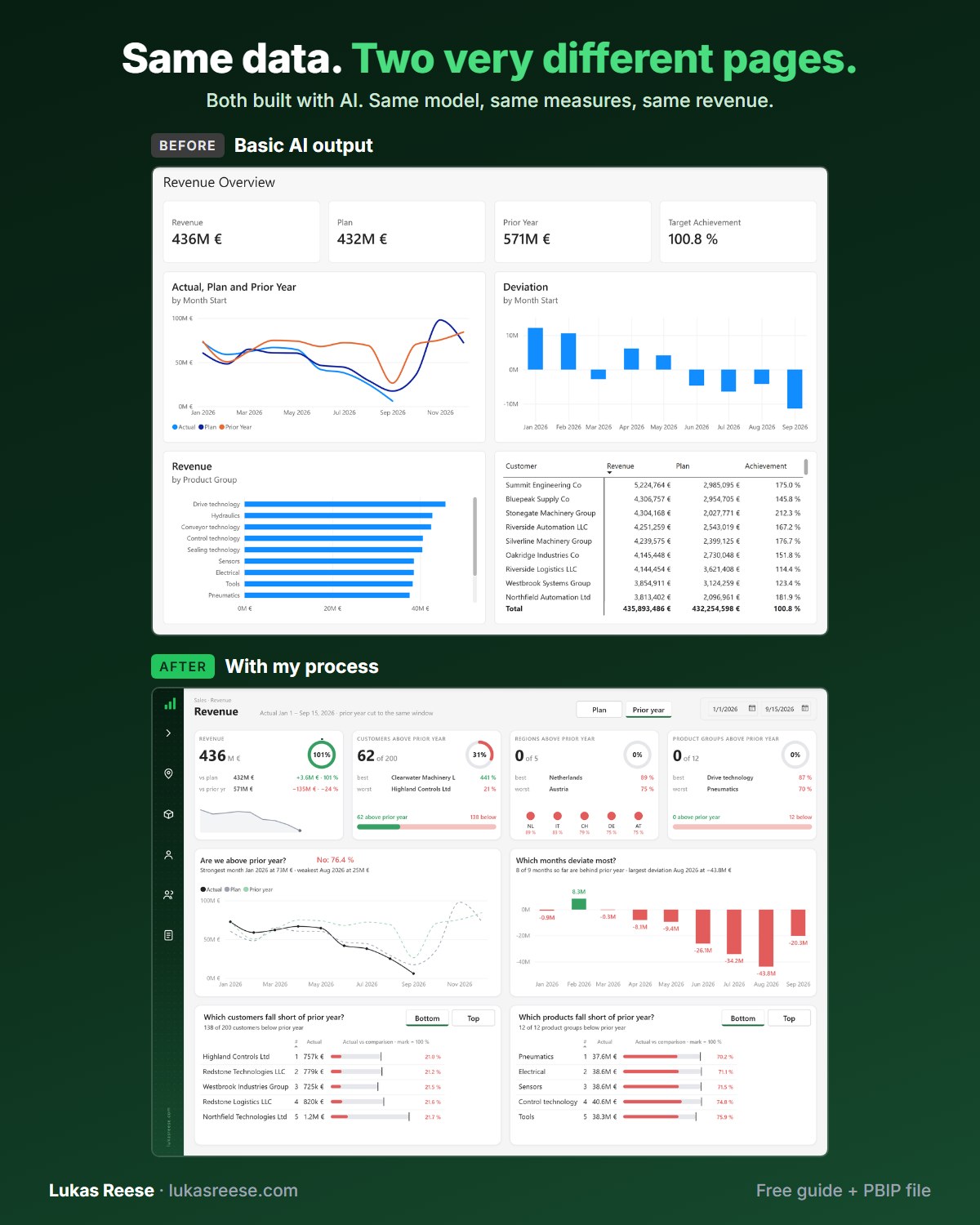
Same data, two very different pages. Both built with AI. This is the process behind the second one.
What you get:
- The 25-page guide: my full process, tool stack and 7 prompts you can copy
- The PBIP file with the same revenue page twice: the basic AI output and the finished page
- Step-by-step explanation, inspiration and real output.
Important: confirm your email
- After you sign up, you get a confirmation email. Click the button in it, then the guide and PBIP file are on their way.
- PBIR stores each page and visual as a separate JSON file, so the report becomes plain text.
- It is the report part only. By contrast, PBIP is the whole project (report plus semantic model).
- Consequently, PBIX is not going away. In fact, PBIX files now contain PBIR too.
- It is the default in the Service and in Desktop, yet Microsoft Learn still labels it preview.
- Above all, it lets AI agents build and edit Power BI reports in a supported way.
Short on time? The three formats, told apart in sixty seconds.
powerbi-report-cli). Where this post says “report authoring skill”, that is now the authoring mode of the new skill. Read what changed: Power BI Report CLI: 4 Skills Merged Into 1.What is PBIR?
PBIR (Power BI Enhanced Report Format) is Microsoft’s publicly documented, folder-based format for the report layer of a Power BI file. Each page, visual, and bookmark is a separate JSON file with a published JSON schema, so any editor, script, or AI agent can read and change it.
Before PBIR, the whole report lived in one report.json file. In fact, that file stored JSON as text inside other JSON, and Microsoft never documented it. As a result, editing it outside Power BI Desktop was unsupported. Rui Romano, the Microsoft product manager behind PBIP, PBIR, and TMDL, said the old format “was never built for anyone other than the Power BI tools” in a Fabric Insider interview with Reza Rad (RADACAD).
Where PBIR Stands in September 2026
Microsoft rolled PBIR out in stages, and the plan changed along the way. For example, the Service rollout paused after issues and restarted in June, according to the official PBIR transition announcement.
| When | What happened |
|---|---|
| January 2026 | First, PBIR became the default for new reports in the Power BI Service. |
| Spring 2026 | However, the rollout paused because of issues with a broader set of reports. |
| June 2026 | Then Microsoft re-enabled the default in the Service. |
| July/August 2026 | Next, Power BI Desktop switched to PBIR by default, including inside PBIX files. |
| General Availability | Still pending. As of August 2026, Microsoft Learn still labels PBIR and PBIP as preview. |
In other words, PBIR is the default today, but it is not yet GA. According to Rui Romano, PBIR is the main reason PBIP has not reached GA, because Microsoft has to move millions of existing reports to one format.
PBIR vs PBIX vs PBIP: What’s the Difference?
PBIX is the single file you share, PBIP is the project folder developers use, and PBIR is the report format that now lives inside both. So they are not competing formats. Instead, they sit at different levels.
The Three Formats Side by Side
| Format | What it is | Who uses it |
|---|---|---|
| PBIX | One compressed file with report, model, and data. Now it also contains a PBIR folder. | Most users, because it is easy to share. |
| PBIP | A project folder: a .Report folder (PBIR) plus a .SemanticModel folder (TMDL). | Teams using Git, CI/CD, and AI agents. |
| PBIR | Only the report layer, as JSON files per page and visual. | Consequently, everyone, whether they notice it or not. |
Similarly, the semantic model has its own text format, TMDL. Together, PBIR and TMDL make up a PBIP project. For the full comparison, read my PBIX vs PBIR vs PBIP guide.
PBIX is not going away. PBIR is not a new file you open; it is how Power BI now stores every report inside PBIX and PBIP.
Rui Romano made the same point in the interview. About PBIX, he said: “I still believe it’s going to be the main file format going forward.” He also noted that only a few hundred thousand users work with PBIP, compared with millions of Power BI developers. Therefore, PBIP stays opt-in, while PBIR becomes the default for everyone.
How PBIR Files Are Structured
A PBIR report is a definition folder with one subfolder per page and one subfolder per visual. For example, this is the structure Microsoft documents:
MyReport.Report/
  definition.pbir            ← format marker + semantic model reference
  definition/
    report.json              ← report-level settings, theme, filters
    version.json
    reportExtensions.json    ← report-level measures (optional)
    pages/
      pages.json             ← page order, active page
      [pageName]/
        page.json            ← page size, background, page filters
        visuals/
          [visualName]/
            visual.json      ← one visual: type, position, fields, formatting
    bookmarks/
      bookmarks.json
      [bookmarkName].bookmark.json
By default, pages and visuals get a 20-character ID as their folder name. However, you can rename them to readable names, as long as you restart Power BI Desktop afterwards.

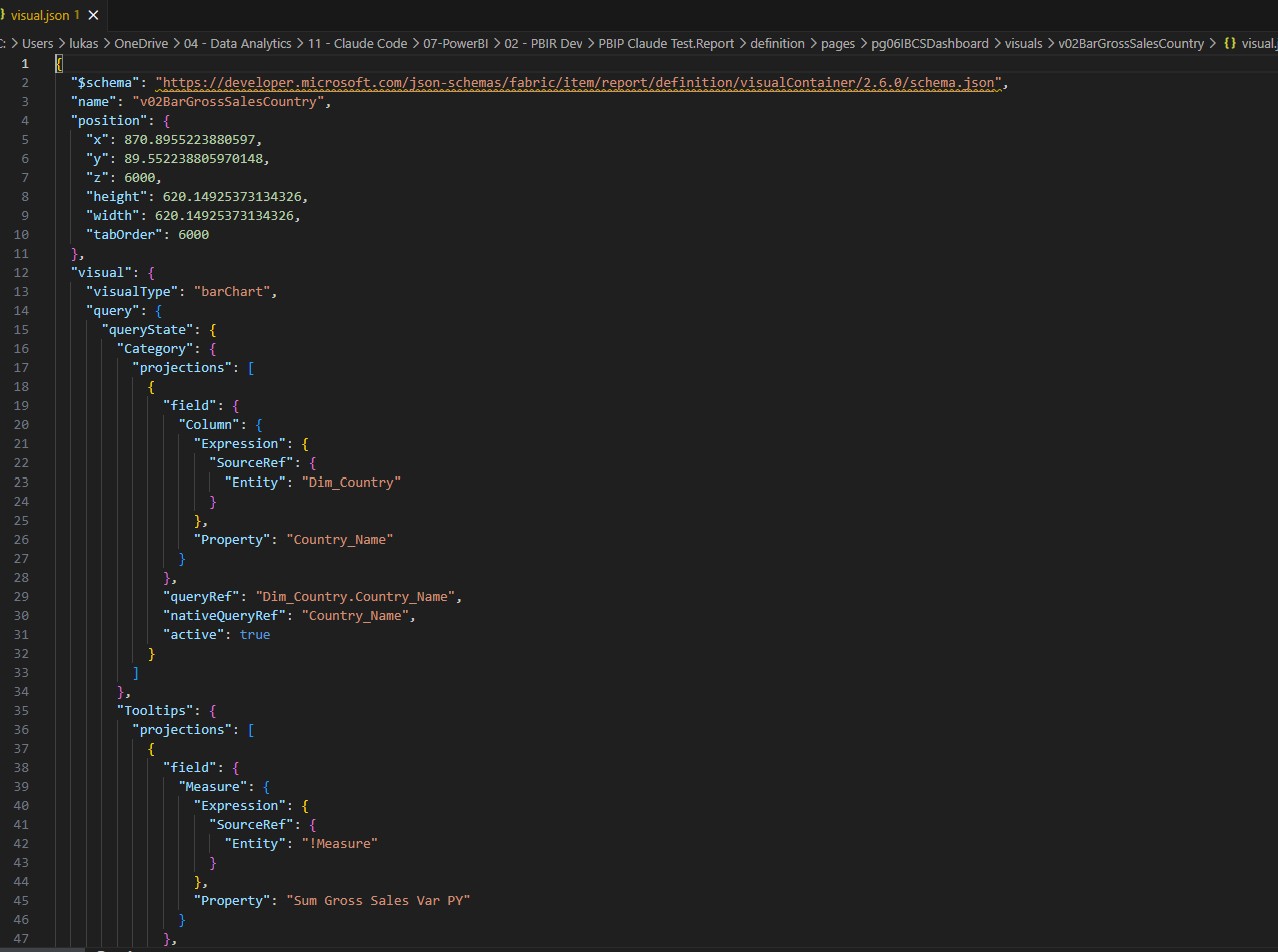
Each visual.json holds the full definition of one visual: its type, position, data fields, and formatting. In addition, every file starts with a $schema link, so VS Code validates it while you type.
PBIR Size Limits in the Power BI Service
The Service also enforces hard limits on PBIR reports, as listed in the Microsoft Learn PBIR documentation:
| Limit | Maximum |
|---|---|
| Pages per report | 1,000 |
| Visuals per page | 1,000 |
| Resource package files per report | 1,000 |
| Size of all report files | 300 MB |
What is PBIR Good For? 5 Benefits
PBIR turns a Power BI report into text, and text is something Git, scripts, and AI can work with. Specifically, these are the five benefits I see in client projects:
| Benefit | What it means in practice |
|---|---|
| 1. Git version control | For example, moving one chart shows up as a small diff, not a changed binary. |
| 2. Team collaboration | As a result, two developers can edit different pages without merge conflicts. |
| 3. CI/CD | Likewise, pipelines can validate and deploy reports with Fabric Git integration or fabric-cicd. |
| 4. AI report building | Moreover, agents can write pages and visuals directly, in a supported way. |
| 5. Batch edits and audits | Similarly, one search finds every visual that uses a measure, across all reports. |
Why PBIR Matters for AI Agents
Benefit 4 is the one that changed my work most. Microsoft “hardened” Power BI Desktop so it no longer assumes it is the only tool editing a report. As Rui Romano explained, that work was done for source control, but then agents came along and profited from it.
Accordingly, Microsoft now ships official tools on top of PBIR: the Power BI modeling MCP server, the report authoring skill, and the Power BI Desktop bridge that lets an agent reload the report and take a screenshot. Furthermore, since the August 2026 update, Desktop detects external changes to PBIP files and applies them with one click.
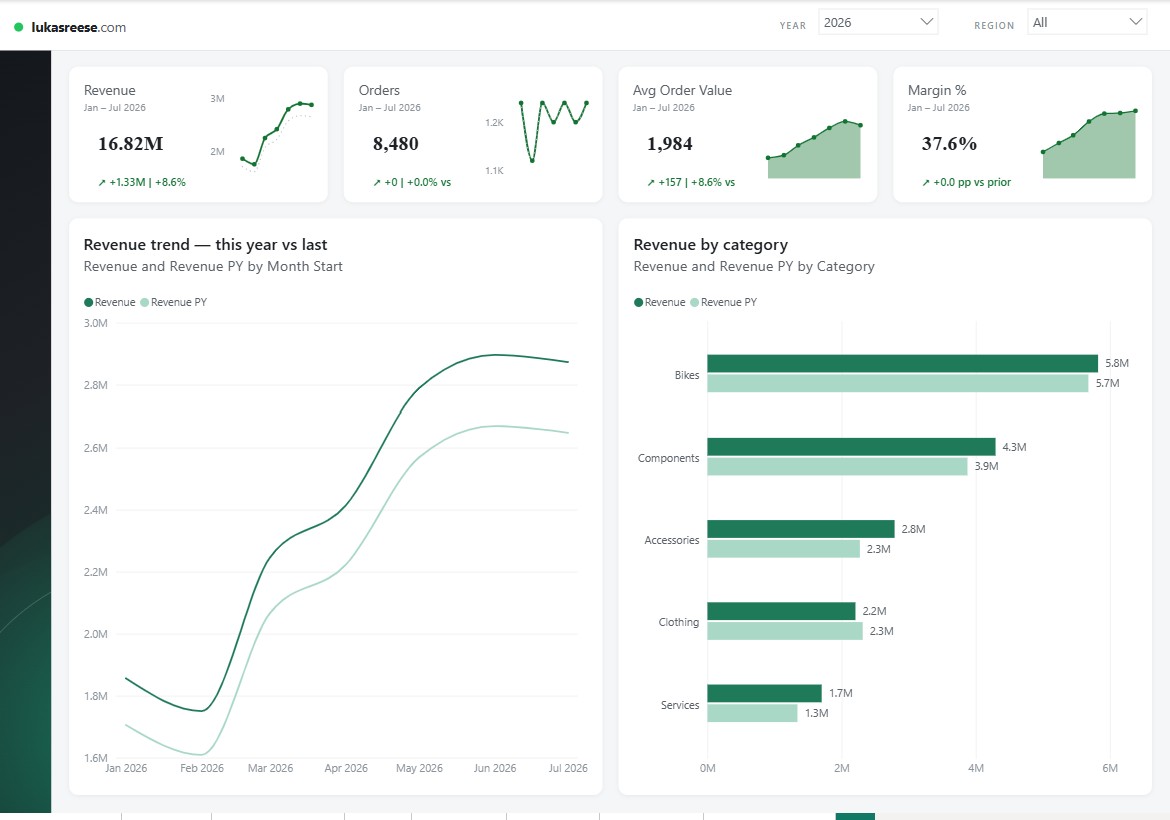
In my testing, an agent builds a full report page in PBIR in minutes. For instance, I walk through the process in how AI builds a Power BI report with PBIR.
With PBIR, Power BI moves from a GUI-only tool to a code-first platform that AI agents can build on.
Want to level up your Power BI skills?
DataCamp offers structured, hands-on courses in Power BI, DAX, and data visualization, so your basics are solid before you move to PBIR and Git. In addition, new users get a significant discount on their first subscription.
Explore DataCamp Courses →How to Enable PBIR in Power BI Desktop and the Service
In current Power BI Desktop versions, PBIR is on by default, so most people do not need to do anything. However, if your version or your admin turned it off, these are the exact settings.
Enable PBIR in Power BI Desktop
- First, go to File > Options and settings > Options > Preview features.
- For PBIP projects, tick Store reports using enhanced metadata format (PBIR).
- For PBIX files, also tick Store PBIR reports using enhanced metadata format (PBIR).
- Finally, restart Power BI Desktop and save your report.

PBIR in the Power BI Service (Admin Setting)
In the Service, new reports use PBIR automatically, and edited reports convert when saved. During the preview, admins can opt out with the tenant setting Automatically convert and store reports in the Power BI enhanced metadata format (PBIR). Keep in mind, though, that Microsoft says conversion becomes mandatory at GA.

How to Fix the “Report Contains Enhanced Report Format (PBIR)” Error
This message means the file was saved in PBIR, but your copy of Power BI Desktop cannot open PBIR right now. It usually asks you to make sure the preview feature “Store reports using PBIR format” is enabled. In my experience, one of three causes is behind it:
- The preview option is off. Therefore, turn on the PBIR options above, restart Desktop, and open the file again.
- Your Desktop is outdated. For example, a colleague saved the file in a newer release. In that case, update Power BI Desktop, because older versions cannot open files from newer releases.
- You use Power BI Desktop for Report Server. Microsoft Learn states that Power BI Projects are not supported in that edition. Consequently, open the file in the regular Power BI Desktop, or ask the author for a copy saved without PBIR.
If none of this helps, check whether the report was converted in the Service. In that case, you can restore the old format, as shown below.
Converting Existing Reports and Rolling Back
You rarely convert by hand anymore. Instead, Power BI Desktop asks you to Upgrade when you save an older project with PBIR enabled. Similarly, the Service converts a report the next time someone edits and saves it.
Once a report is PBIR, you cannot switch it back from the Desktop UI. However, both sides keep a backup, according to Microsoft Learn:
| Where | Backup | How to roll back |
|---|---|---|
| Power BI Desktop | Kept for 30 days in the TempSaves\Backups folder | Then open the backup copy instead. |
| Power BI Service | Kept for 28 days as PBIR-Legacy | In report settings, select Restore as PBIR-Legacy. |
My advice: keep your reports in Git before any big migration. That way, you have your own rollback that never expires.
PBIR Limitations and What’s Next
PBIR is stable enough for daily work, but a few limits still apply. Most of them come from the PBIP side, according to the Microsoft Learn limitations list:
- Sensitivity labels are not supported with Power BI Projects.
- File paths are limited to 260 characters by default on Windows, so keep project folders short.
- Saving a PBIP directly to OneDrive or SharePoint is not supported.
- External edits must be saved as UTF-8 without BOM.
- Visual automatic filters only persist after you have opened the filter pane once.
From my own work, the JSON schemas also change between versions. For example, I have hit schema URLs that returned 404 errors, so always check the version your Desktop writes.
What Comes Next for PBIR
Rui Romano outlined the direction in the Fabric Insider interview. First, GA for PBIP and PBIR, which matters for enterprises that cannot use preview features. Second, the modeling MCP will become an “authoring” MCP that covers more than modeling. Third, Microsoft hopes that eventually a PBIX is simply a zipped PBIP. Overall, the report format is becoming the foundation for agentic Power BI development.
Frequently Asked Questions
What is PBIR in simple terms?
Is PBIR replacing PBIX?
What is the difference between PBIR and PBIP?
How do I turn on PBIR in Power BI Desktop?
Is PBIR generally available yet?
Does PBIR work with Power BI Report Server?
Want to See PBIR in Action?
I build Claude skills that write Power BI reports as PBIR JSON, including IBCS variance charts with zero paid add-ons. See how it works.
Where to Go Next
PBIR is the format. What makes it worth caring about is what you can now point at it.
- PBIX vs PBIR vs PBIP: the three formats side by side.
- Claude Code Power BI workflow: my 8-step process for building reports with an agent.
- Speed up Power BI report development: the five jobs that pay off first.
Lukas Reese
Power BI Developer & Consultant based in Hannover, Germany. Building Claude skills for PBIR-based Power BI development, specializing in dashboard design, IBCS visuals, data modeling, and AI-powered report generation. Connect on LinkedIn →