
Key Takeaways
- Claude skills are markdown files that teach AI how you work — no code required.
- The Claude skills starter kit includes three foundational skills — brand identity, learning log, and session memory — that form a self-learning AI ecosystem.
- As a result, the system improves automatically as you work: corrections get logged and context carries over between sessions.
- Additionally, skills are LLM-agnostic — they work with Claude, ChatGPT, Copilot, or any AI that reads text.
- The Claude skills starter kit is free and open source on GitHub.
The Claude skills starter kit is a free, open-source collection of three foundational AI skills that turn disconnected prompts into a self-learning AI system. Instead of repeating the same instructions every session, you write your knowledge down once in a markdown file — and AI applies it automatically from that point forward. I built this starter kit to help solopreneurs, freelancers, and small teams get started with Claude skills quickly, and it’s available on GitHub.
As a solo Power BI consultant and solopreneur, I switched from ChatGPT to Claude three weeks ago and started building this self-learning AI system for my daily work. Since then, I’ve been using Claude skills for writing blog posts, creating Power BI reports with AI, drafting LinkedIn content, and managing my brand. I’m not an expert at this — I’m learning as I go. However, the shift from individual prompts to a connected self-learning AI system has already made a noticeable difference in how I run my business.
This post walks through the three starter skills, explains how they work together, and shows you how to set them up for your own business.
What Are Claude Skills?
Claude skills are structured text files — typically markdown — that provide AI with reusable instructions for specific tasks. Anthropic introduced this concept in October 2025 as part of the Claude ecosystem, and it has since become an open standard adopted across the AI industry.
Think of a skill as a playbook. Rather than explaining your preferences, standards, and workflows every time you open a new chat, you write them down once in a .md file. When Claude starts a task, it reads the file and follows the instructions automatically.
A skill is not a prompt. A prompt is a one-time instruction. A skill, on the other hand, is reusable knowledge that compounds over time.
The file structure behind Claude skills
The format is straightforward: a folder with a SKILL.md file inside. That’s the minimum requirement. Some skills also include additional reference files, templates, or scripts — but the core is always a markdown document that any AI can read. In addition, Anthropic maintains a public repository on GitHub with examples and community contributions.
Why I Switched from Prompts to a System
For months, my AI workflow looked like this: open ChatGPT, type a question, get an answer, close the tab. As a result, every session started from zero. I had a folder of saved prompts, but they were disconnected — each one solving a single problem with no memory of what came before.
The turning point came when I realized that I kept correcting the same mistakes. “Don’t use that tone.” “Always use this format.” “Remember, my brand color is #22C55E, not #00FF00.” Unfortunately, every correction disappeared when the session ended.
How skills changed my workflow
When I switched to Claude and discovered skills, the change was immediate. Instead of correcting AI repeatedly, I wrote each correction down once in a skill file. By the next session, it was already applied. After just a few days, I had a small ecosystem of interconnected skills that knew my standards, my preferences, and my project context.
That’s essentially the difference between using AI as a search engine and building a self-learning AI system around it — especially as a solopreneur who needs every tool to pull its weight.
What’s Inside the Claude Skills Starter Kit
The Claude skills starter kit is a free, open-source collection of three foundational skills that work together. They’re generic by design — you download them, fill in your own details, and can start using them immediately.
| Skill | Purpose | What It Captures | Setup Time |
|---|---|---|---|
| Brand Identity | Consistent visual and verbal output | Colors, fonts, tone of voice, formatting rules | 10-15 min |
| Learning Log | Self-improving memory | Corrections, preferences, patterns | 5 min |
| Session Memory | Cross-session continuity | Decisions, files changed, open threads | 2 min |
Each skill contains [YOUR ...] placeholder sections that you fill in with your own business details. In other words, the skills are designed to be customized — they’re a starting point, not a finished product.
Skill 1: Brand Identity
The brand identity skill serves as the foundation of the claude skills starter kit. It teaches AI your visual standards (colors, fonts, layout preferences) along with your verbal identity (tone of voice, word choices, formatting rules). For solopreneurs, this is especially valuable — it ensures that every piece of content AI produces matches your professional standards without you having to specify them each time.
In practice, this means that every document, presentation, blog post, and email AI creates for you automatically follows the same visual and verbal standards — without you having to specify them each time.
How to set it up
To get started, open the SKILL.md file and fill in your colors (hex codes), fonts, tone descriptors (“direct, pragmatic, no corporate speak”), and any formatting rules you care about. The whole process takes about 10 minutes.
Skill 2: Learning Log
The learning log is what makes the system self-learning. It’s a structured file that captures corrections and preferences as you work. For example, when you tell AI “don’t do it that way” or “I prefer this format,” the learning log saves it. Consequently, the next session AI reads the log before starting — and the correction is already applied.
The learning log turns every correction into permanent knowledge. After a few weeks, AI rarely makes the same mistake twice.
How entries work
Each entry includes a date, context (what you were working on), the actual learning (specific and actionable), and a category (preference, process, technical, or correction). Furthermore, entries are stored newest-first so AI sees the most recent patterns first.
The best part is that you don’t need to write entries manually — the skill instructs AI to log automatically whenever it detects a correction or a new preference being established.
Skill 3: Session Memory
Session memory solves the context loss problem that most AI users experience. Every time you close a chat and start a new one, AI typically forgets everything — what you discussed, what decisions were made, what files were changed, and what’s still open. However, session memory captures all of that in a structured file.
What gets captured
At the end of each work session, the skill creates a memory file with key decisions, topics discussed, files changed, and — most importantly — open threads. As a result, the next session AI reads the recent memory files and picks up exactly where you left off.
Learning Log vs. Session Memory
The learning log captures how you like things done (timeless preferences). In contrast, session memory captures what happened (chronological events). Both are essential — one prevents repeated mistakes, while the other prevents repeated conversations.
How the Three Skills Work Together
The three skills in the claude skills starter kit form a connected system, not three isolated files:
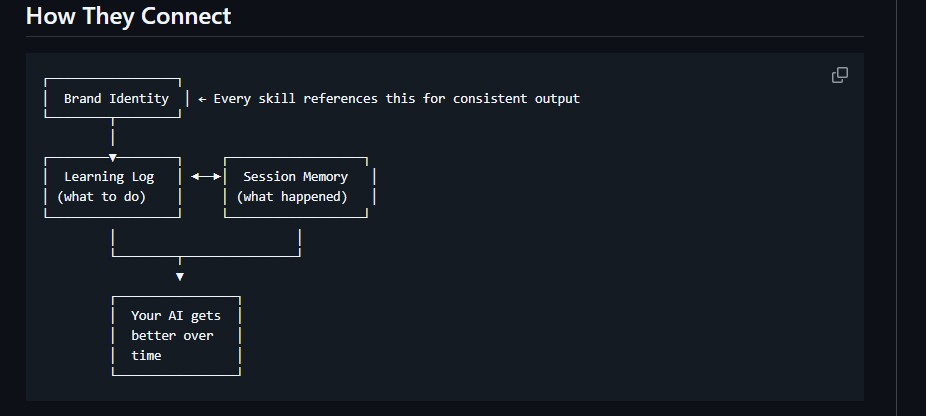
- Brand identity is the foundation — both other skills reference it to maintain consistency across all outputs.
- Learning log captures corrections to how brand rules are applied. Over time, it becomes a detailed guide to your preferences.
- Session memory, meanwhile, provides context for the learning log. If a correction was made during a project, the session memory records why.
The compound effect of the claude skills starter kit
When you open a new session, AI reads all three skills: it knows your brand standards (brand identity), your accumulated preferences (learning log), and what you were working on yesterday (session memory). That’s the ecosystem — each piece reinforcing the others.
Skills are just markdown files. You can share them, adapt them, and use them with any AI that reads text — not just Claude.
How the Claude Skills Starter Kit Helps My Business
I want to be honest: I’m three weeks into this. I’m not claiming to have it all figured out. While some skills work beautifully, others need rewriting. I’m still debugging, iterating, and learning what works.
Nevertheless, here’s what I can say after three weeks of using this system as a solo consultant:
- I no longer re-explain my brand standards. Every document, post, and presentation already follows my guidelines.
- Corrections stick. When I fix something once, it stays fixed across all future sessions.
- I pick up projects without losing context, because the session memory tells AI exactly where we left off.
- In addition, I’m building Power BI-specific skills that automate report creation using the PBIR format — turning Power BI into a code-first tool.
- I also use skills for content creation — blog writing, keyword research, and LinkedIn drafts — all following my voice and SEO standards.
What I’ve noticed after 3 weeks
The compound effect is real. Each skill I add benefits from all the others. Moreover, the learning log means the whole system improves passively — just by me using it and occasionally correcting something.
I believe this self-learning AI system can help other solopreneurs, freelancers, and small teams too. Whether you’re a Power BI developer, a content creator, or any kind of consultant — if you’re running a business and using AI regularly, even a small investment in building Claude skills could save you significant time. That’s exactly why I open-sourced the claude skills starter kit.
Getting Started with the Claude Skills Starter Kit
Here’s how to set up the claude skills starter kit in about 20 minutes:
- Clone the repo:
git clone https://github.com/lukasreese/claude-skills-starter-kit.git - Start with brand identity. Open
skills/brand-identity/SKILL.mdand fill in your colors, fonts, and tone of voice. This takes 10 minutes and provides the foundation for everything else. - Set up the learning log. Create a
learnings/folder and one topic file (e.g.,my-work.md). Then seed it with 3-5 things you already know AI gets wrong about your work. - Enable session memory. Create a
session-memory/folder. At the end of your next work session, simply ask AI to save a session summary. That’s it — the system grows from there. - Point Claude at the folder. In Claude Desktop or Cowork, give AI access to the folder containing your skills. It reads them automatically at the start of each task.
You don’t need to build 20 skills on day one. Instead, start with these three and use them for a week. Then add more as you discover patterns in your work. The system grows naturally over time.
Frequently Asked Questions
Do Claude skills only work with Claude?
No. Skills are markdown files — plain text that any AI can read. While I built mine for Claude, the format also works with ChatGPT, Copilot, Gemini, or any other LLM. The concept of teaching AI through structured instructions is universal.
Do I need coding skills to use the starter kit?
Not at all. Skills are text files written in markdown — a simple formatting language. If you can write a bulleted list, you can write a skill. Furthermore, the starter kit comes with templates that you simply fill in with your own details.
How long does it take before the system actually gets better?
In my experience, after about one week of active use, the learning log has enough entries that you notice fewer corrections. After two weeks, the session memory provides enough continuity that you rarely need to re-explain context. It’s a gradual improvement, not an overnight transformation.
Can I use the claude skills starter kit as a team?
Absolutely. For teams, shared skills (like brand identity) ensure everyone’s AI follows the same standards. Meanwhile, individual skills (like personal learning logs) can remain private. The starter kit is designed for individual use but scales naturally through shared skill files.
What should I build after the three starter skills?
Whatever you repeat most. For instance, if you write proposals, build a proposal skill. If you do code reviews, build a code review skill. Each new skill benefits from the brand identity, learning log, and session memory that are already in place.
Get the Starter Kit
Free, open source, ready to customize.
Microsoft now publishes first-party Power BI skills of its own. The Power BI report authoring skill is the one to start with, and it is worth reading before you write your own from scratch.
View on GitHubI’ll be documenting my journey with skills — new ones I build, what works, what breaks, and what I’d do differently. Follow along on LinkedIn or check back here for updates. If you build something with the starter kit, I’d love to hear about it.
Where to go next
The starter kit is the general pattern. These are the Power BI specific skills built on top of it, and the format that makes them possible.
- Power BI report authoring skill — Microsoft’s official skill, install and limits.
- Power BI Desktop Bridge — how an agent checks its own work.
- Speed up Power BI report development — the five jobs worth automating first.
- PBIX vs PBIR vs PBIP — the three Power BI file formats told apart.
Lukas Reese is a freelance Power BI developer helping analytics teams build clear, scalable dashboards. He is currently exploring how Claude skills can transform solo consulting workflows. Connect on LinkedIn or check out his GitHub.